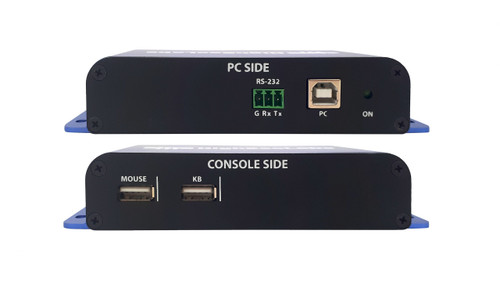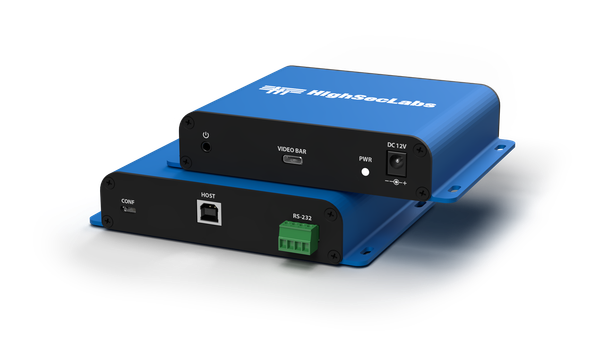

The Kramer FS11USB2 connects a supported asynchronous USB-C videobar to a USB 2.0 host through an isolation device. It supports microphone operation and RS232 configuration.
FS11USB2 Detailed Features
- Add isolation to a supported videobar connection. The unit sits between a host computer and a compatible USB-C videobar. It is designed for conferencing installations that need a controlled media connection at the computer boundary.
- Use device emulation to separate endpoints. The media-emulator architecture represents the peripheral to the host and the host to the peripheral. This avoids treating the videobar connection as an unrestricted direct USB link.
- Connect through USB 2.0 interfaces. The host side uses USB Type B and the videobar side uses USB Type C. The connector shape alone does not establish compatibility: the videobar must support the manufacturer's required asynchronous transfer mode.
- Support microphone operation. This model supports microphone functionality for approved conferencing arrangements. Media operation follows the diode's controlled channels rather than the behavior of an ordinary general-purpose USB hub.
- Give users control of media availability. The manufacturer documents push-button activation and timed media operation. These controls help users manage when supported microphone and camera paths are enabled during a session.
- Configure the installation through RS-232. A four-pin serial configuration connection and remote-control support allow the device to be integrated into a managed setup. Commission the configuration for the selected videobar and host arrangement.
- Use the included external power supply. The unit requires 12V DC and includes an AC/DC supply. Allow for this power connection when locating the device near a meeting-room computer or conferencing endpoint.
Specifications
| Manufacturer part number | CPN35322 |
|---|---|
| FEATURES — Input Interface (Host) | USB 2.0 Type B |
| FEATURES — Output Interface (Videobar) | USB 2.0 Type C |
| FEATURES — Microphone Support | Yes |
| FEATURES — Device Compatibility | Standard USB-C Videobars (Asynchronous Transfer Mode) |
| REMOTE CONTROL — Support | Yes |
| REMOTE CONTROL — Configuration Port | 4-pin RS-232 Terminal Block |
| PHYSICAL — Dimensions | 104x28x140mm / 4.1x1.1x5.5in |
| PHYSICAL — Weight | 0.3kg / 0.64lbs |
| ENVIRONMENTAL — Operating Temperature | 32°F to 104°F (0°C to 40°C) |
| ENVIRONMENTAL — Storage Temperature | '-4°F to 140°F (-20°C to 60°C) |
| ENVIRONMENTAL — Humidity | Operating - 20% to 80% non-condensing; Storage - 10% to 90% non-condensing |
| ENVIRONMENTAL — Altitude | 0 to 10,000 ft |
| POWER — Power Requirements | 12VDC 1.5A |
| POWER — AC Input | 100 to 240V AC |
| POWER — Power Source | External AC/DC power supply, included |
| GENERAL INFO — Manufactured | BAA & TAA Compliant |
| GENERAL INFO — Product life-cycle | 10 years |
Technical Questions and Answers
What does the FS11USB2 do?
The Kramer FS11USB2 connects a supported asynchronous USB-C videobar to a USB 2.0 host through an isolation device. It supports microphone operation and RS232 configuration.
What is specified for input interface (host)?
USB 2.0 Type B
What is specified for output interface (videobar)?
USB 2.0 Type C
What is specified for microphone support?
Yes
What is specified for device compatibility?
Standard USB-C Videobars (Asynchronous Transfer Mode)
What is specified for support?
Yes
What is specified for configuration port?
4-pin RS-232 Terminal Block
What is specified for dimensions?
104x28x140mm / 4.1x1.1x5.5in
Choosing the Right Product
What is the Kramer FS11USB2 used for?
It is used for supported videobar installations requiring USB isolation. Connects a supported asynchronous USB-C videobar to a USB 2.0 host through an isolation device. It supports microphone operation and RS232 configuration.
Who should choose the FS11USB2?
Choose this model when your project needs supported videobar installations requiring USB isolation. Compare the model-specific connections and specifications above with the equipment in your system.
What should I check before ordering the FS11USB2?
Confirm manufacturer part CPN35322, the required connections and the installation requirements. Use the linked documentation to check compatible equipment and required accessories.