



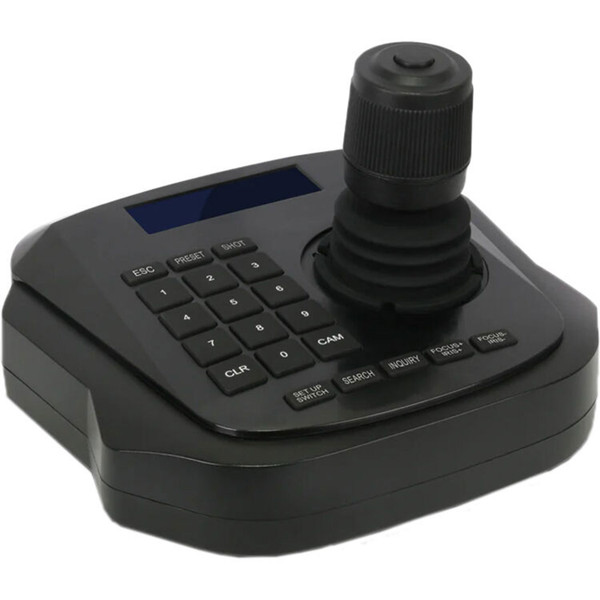


This DVDO Camera-Ctl-Mini Mini IP PTZ Camera Controller with Joystick is a small PTZ controller with a joystick, an LCD display and 20 buttons that can control up to 1024 cameras over IP, allowing you to control numerous cameras from a single remote locations. This 4D joystick, up/down, left/right, zoom in/out, and confirm, can control pan, tilt, zoom as well as focus, iris, and cruise.
The controller can save up to ten position presets for each of the 1024 cameras. It features a web-based GUI that allows easy set up and configuration of the connected cameras.
DVDO Camera-Ctl-Mini Mini IP PTZ Camera Controller with Joystick Features:
- 4D joystick (up/down, left/right, zoom in/out, confirm) for pan, tilt and zoom control of the cameras
- LCD display & soft keyboard with 20 buttons
- Controls up to 1,024 PTZ cameras over IP
- Controls include focus, zoom, iris, preset, cruise,…
- Saves & recalls up to 10 position presets for each camera
- Supports ONVIF protocol and auto-discovery
- Cameras can be added when controller is offline
- Web-based GUI for easy setup and configuration
Why not buy this DVDO Camera-Ctl-Mini Mini IP PTZ Camera Controller with Joystick today?
DVDO-Camera-Ctl-Mini User Manual
HDTV Supply partners with DVDO to sell and support all DVDO products
Why not buy this DVDO Camera-Ctl-Mini Mini IP PTZ Camera Controller with Joystick today?
Can this controller discover IP PTZ cameras on my local network automatically?
A: Yes; the controller supports ONVIF and can auto-discover ONVIF-compatible devices on the same LAN segment.
Will the controller work if the camera and controller have different IP subnets?
A: No; the controller and cameras must be on the same LAN network segment unless you change one device’s IP to match the other's segment.
How do I add a camera to the controller when it's offline?
A: You can add cameras via the controller’s interface even when the controller is offline using the manual add function and by entering the camera’s username and password.
What user accounts and permission levels are available on the controller?
A: The controller provides multiple account types: super administrator (default), administrator, operator, and visitor, each with progressively fewer permissions.
Does the controller provide a web interface for setup and configuration?
A: Yes; the controller runs a built-in web server and provides a web-based GUI for setup and camera configuration via a browser.
What happens if I enter the wrong camera credentials or the camera goes offline?
A: The controller will show "Username" or "Password Error" if credentials are wrong and display "Equipment offline" when it cannot reach the camera on the LAN.
Can I change the controller's IP addressing mode between dynamic and static?
A: Yes; the LAN settings let you choose dynamic (DHCP) or set a static IP and related network parameters manually.
How do I recover the controller if a configuration change breaks operation?
A: You can use the Factory Reset function to restore default settings or use Restart for routine maintenance when needed.
Can I upgrade the controller firmware locally and what should I avoid during upgrade?
A: Yes; use the Upgrade menu to upload the correct update file and start the update, and avoid powering off or interrupting the network during the process.


