



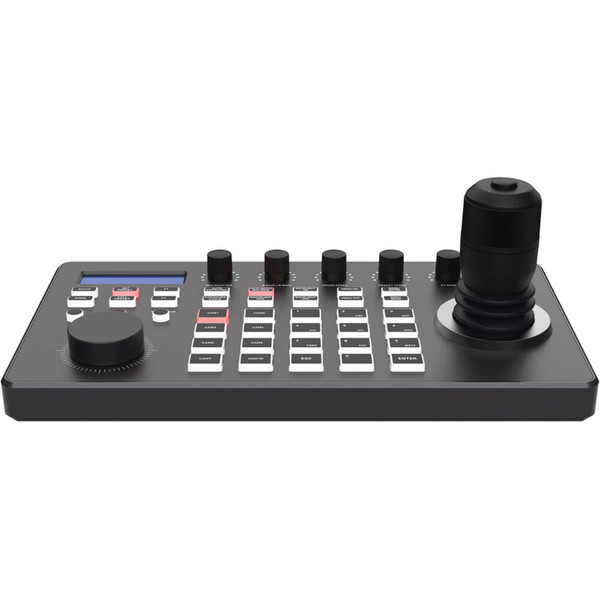


This DVDO Camera-Ctl-2 IP PTZ Camera Controller with Joystick features an integrated LCD screen, multiple knobs, and several backlit buttons for direct camera selections, and a 4D joystick with variable speed. The controller can manage up to 255 PTZ cameras through IP and/or serial connections. Its controls include Pan, Tilt, Zoom, PTZ speed, Focus, Iris, White Balance, and R/B color correction.
The web-based GUI simplifies camera setup and configuration, and the controller can be powered either by an external power supply or via Power over Ethernet (PoE).
DVDO Camera-Ctl-2 IP PTZ Camera Controller with Joystick Features:
- Controls up to 255 PTZ cameras over IP and/or serial
- RS-232, RS-422, and RS-485 supported within the same network
- Supports NDI, ONVIF, VISCA, and Pelco protocols, as well as auto discovery
- 4D joystick (up/down, left/right, zoom in/out, confirm) with variable speed
- Additional circular knob for zoom adjustment
- Seven buttons for direct camera selections
- Other controls include PTZ speed, focus, iris, white balance, and R/B color correction
- Web-based GUI for easy setup and configuration
- Tally control function
- Supports PoE or external 12V power supply options
Why not buy this DVDO Camera-Ctl-2 IP PTZ Camera Controller with Joystick today?
HDTV Supply partners with DVDO to sell and support all DVDO products
Why not buy this DVDO Camera-Ctl-2 IP PTZ Camera Controller with Joystick today?
Can this controller manage 255 PTZ cameras as a single total across IP and serial?
A: Yes — the controller can manage a total of up to 255 PTZ cameras using a mix of IP and serial (hybrid) connections.
Which network and camera control protocols does the controller support?
A: It supports NDI, ONVIF, VISCA, and Pelco protocols and includes an auto-discovery feature.
Which serial interfaces are supported on the controller and can they coexist on the same network?
A: RS-232, RS-422, and RS-485 are supported and the manual states they can be used within the same network.
How does the joystick operate for pan, tilt and zoom?
A: The 4D joystick controls up/down/left/right for pan and tilt and rotates for zoom in/out, with variable speed for PTZ control.
Does the controller provide physical controls for focus, iris, white balance, and color gain?
A: Yes — the unit includes controls for focus, iris, white balance, PTZ speed, and R/B color correction.
What are the documented capacity limits when using serial groups for Visca and Pelco?
A: The manual documents Visca over RS422 in groups of up to 7 cameras and Pelco over RS485 up to 255 devices, with Visca over IP also supporting up to 255.
Does the controller include tally control and direct camera selection buttons?
A: Yes — it includes a tally control function and seven direct camera selection buttons.
Can I configure cameras and network settings from a web interface, and what is the default IP mode?
A: Yes — the device provides a web-based GUI for setup and configuration, and its default IP acquisition method is DHCP (dynamic).
Are firmware upgrades and configuration import/export supported from the web UI?
A: Yes — the web UI supports system upgrades and lets you import or export device configuration information.
Do I need to keep the controller and cameras on the same LAN segment?
A: Yes — the controller and cameras must be on the same network segment unless you first modify the IP addresses so they share a segment.
What default port numbers are shown for Visca over IP, Sony Visca and ONVIF when adding a network camera?
A: The manual lists IP Visca default port 1259, Sony Visca default 52381, and ONVIF defaults of 2000 or 80.
How do I restore or clear added devices and settings if I need a fresh start?
A: Use the Device Reset function in the web UI to delete configuration information and clear added devices.
Should I use surge protection with this controller?
A: Yes — surge protection is recommended to protect the controller's sensitive electronics from spikes and surges.


