



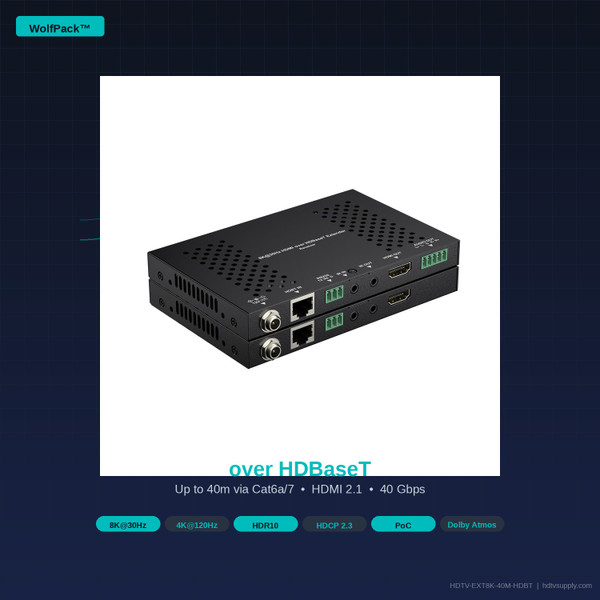


What Is the WolfPack HDTV-EXT8K-40M-HDBT?
The WolfPack HDTV-EXT8K-40M-HDBT is a professional-grade HDMI 2.1 extender kit from HDTV Supply that transmits 8K@30Hz 4:4:4, 8K@60Hz 4:2:0, and 4K@120Hz video signals over a single Cat6a or Cat7 cable — up to 40 meters (131 feet). Built on the HDBaseT 1.0 standard, it supports the full HDMI 2.1 bandwidth of 40 Gbps.
Unlike conventional 4K HDMI 2.0 extenders limited to 18 Gbps, this unit handles next-generation display resolutions and frame rates — including 1080P@240Hz for high-refresh gaming, Dolby Atmos and DTS:X immersive audio, and HDR10 high dynamic range video — all over a single structured cable with no signal degradation.
The slim, rack-mountable transmitter and receiver units include bidirectional Power over Cable (PoC), meaning a single power adapter at either end powers both units. Bidirectional IR and RS-232 passthrough allow full remote control of source and display devices from either end of the installation.
Key Features
- HDMI 2.1 at 40 Gbps — 8K@30Hz 4:4:4, 8K@60Hz 4:2:0, 4K@120Hz
- HDBaseT 1.0 over a single Cat5e / Cat6 / Cat6a / Cat7 — no fiber, no coax
- HDCP 2.3 compliant — all 4K and 8K protected content supported
- HDR10 high dynamic range video passthrough
- Bidirectional PoC — one power adapter powers both TX and RX units
- De-embedded analog stereo audio output (3.5mm) on the receiver
- PCM 7.1, Dolby Atmos, DTS:X, Dolby TrueHD, DTS-HD MA passthrough
- Bidirectional IR passthrough (30–50 kHz) — control source from display end
- Bidirectional RS-232 passthrough — full serial control integration
- DIP switch EDID management: Copy, 4K@60, 4K@30, 1080P modes
- Slim profile: 140mm × 15.3mm × 90.2mm — rack-mountable with included brackets
- Firmware updatable via Micro USB port on both TX and RX units
Ideal Applications
Home Theater & Media Rooms
Route 8K Blu-ray or streaming sources from an equipment rack to a remote 8K display through walls without bulky HDMI cables.
Next-Gen Gaming
Extend PS5 or Xbox Series X at 4K@120Hz from a media cabinet to a gaming display up to 40m away over a single Cat6a cable.
Corporate AV & Conference Rooms
Connect PC or laptop sources to large-format displays or video walls with clean, concealed cabling through walls and ceilings.
Digital Signage
Drive 4K or 8K digital signage displays from a central media player using existing Cat6 infrastructure without rewiring.
Education & Lecture Halls
Extend a presenter’s laptop to a projector or large display at the front of a lecture hall, with IR control of the display from the podium.
Broadcast & Production
Extend 8K camera feeds or monitoring signals within a broadcast facility using existing structured cabling infrastructure.
Technical Specifications
| Specification | Detail |
|---|---|
| HDTV Supply Part Number | HDTV-EXT8K-40M-HDBT |
| Manufacturer Model | EXT10-8K01-000 (TX) & EXR10-8K01-000 (RX) |
| HDMI Version | HDMI 2.1 |
| Bandwidth | 40 Gbps |
| Max Video Resolution | 8K@30Hz (4:4:4) / 8K@60Hz (4:2:0) / 4K@120Hz / 1080P@240Hz |
| HDR Support | HDR10 |
| Content Protection | HDCP 2.3 |
| Transmission Technology | HDBaseT 1.0 |
| Max Distance — Cat5e / Cat6 | 35 meters (114 feet) |
| Max Distance — Cat6a / Cat7 | 40 meters (131 feet) |
| Cable Type | Single Cat5e, Cat6, Cat6a, or Cat7 (STP/FTP recommended) |
| Audio Formats | PCM 2.0 / 5.1 / 7.1, Dolby Atmos, DTS:X, Dolby TrueHD, DTS-HD MA |
| Audio Output (RX) | De-embedded stereo analog out (3.5mm jack) |
| IR Passthrough | Bidirectional, 30–50 kHz |
| RS-232 Passthrough | Bidirectional, 3-pin terminal block |
| Power (PoC) | Bidirectional — one 5V/3A adapter powers both TX and RX |
| EDID Management | DIP switch: Copy EDID / 4K@60 / 4K@30 / 1080P |
| Firmware Update | Micro USB port on TX and RX |
| Dimensions (each unit) | 140mm × 15.3mm × 90.2mm (W × H × D) |
| Mounting | Rack-mountable with included brackets |
| Power Supply Input | 100–240V AC, 50/60Hz |
| Operating Temperature | 0°C to 40°C (32°F to 104°F) |
| Warranty | 2-Year Advance Replacement |
| Technical Support | Free Lifetime (Phone, Chat, Email) |
| Availability | In Stock — Ships Same Day |
What’s in the Box
- 1× Transmitter unit (EXT10-8K01-000)
- 1× Receiver unit (EXR10-8K01-000)
- 1× 5V/3A power adapter
- 2× Rack-mount brackets
- 1× IR blaster cable
- 1× IR receiver cable
- 1× RS-232 cable
- 1× User manual
Signal Distance Guide
| Resolution / Frame Rate | Cat5e / Cat6 | Cat6a / Cat7 |
|---|---|---|
| 8K@30Hz (4:4:4) | Up to 35m (114ft) | Up to 40m (131ft) |
| 8K@60Hz (4:2:0) | Up to 35m (114ft) | Up to 40m (131ft) |
| 4K@120Hz (4:4:4) | Up to 35m (114ft) | Up to 40m (131ft) |
| 4K@60Hz (4:4:4) | Up to 35m (114ft) | Up to 40m (131ft) |
| 4K@30Hz (4:4:4) | Up to 35m (114ft) | Up to 40m (131ft) |
| 1080P@240Hz | Up to 35m (114ft) | Up to 40m (131ft) |
| 1080P@60Hz | Up to 35m (114ft) | Up to 40m (131ft) |
Cable Selection Guide
| Cable Category | Max Bandwidth | Recommended Use |
|---|---|---|
| Cat5e | 1 Gbps / 100 MHz | Up to 35m at all supported resolutions |
| Cat6 | 1 Gbps / 250 MHz | Up to 35m — preferred over Cat5e for reliability |
| Cat6a | 10 Gbps / 500 MHz | Recommended — full 40m range at 8K and 4K@120Hz |
| Cat7 | 10 Gbps / 600 MHz | Full 40m range — best shielding for noisy environments |
Source & Display Compatibility
The HDTV-EXT8K-40M-HDBT is compatible with all HDMI 2.1, HDMI 2.0, and HDMI 1.4 sources and displays. HDCP 2.3 compliance ensures full compatibility with all copy-protected content.
| Device Type | Compatible | Notes |
|---|---|---|
| 8K TVs (Samsung, LG, Sony) | ✓ Full 8K@30Hz | Use Cat6a for full 40m range |
| 4K@120Hz Gaming Displays | ✓ Full 4K@120Hz | PS5, Xbox Series X, PC gaming |
| 4K@60Hz TVs & Monitors | ✓ Full 4K@60Hz | Backward compatible with HDMI 2.0 |
| 1080P Displays | ✓ Full 1080P | Backward compatible with HDMI 1.4 |
| PlayStation 5 | ✓ 4K@120Hz | HDCP 2.3 required — fully supported |
| Xbox Series X | ✓ 4K@120Hz | HDCP 2.3 required — fully supported |
| Apple TV 4K (3rd Gen) | ✓ 4K@60Hz HDR | Dolby Atmos passthrough supported |
| 4K Blu-ray Players | ✓ Full HDR10 | Dolby TrueHD and DTS-HD MA passthrough |
| Streaming Devices (Netflix 4K) | ✓ HDCP 2.3 | Netflix, Disney+, Amazon Prime 4K HDR |
| PC / Laptop (HDMI 2.1 GPU) | ✓ 8K / 4K@120Hz | NVIDIA RTX 3000+, AMD RX 6000+ series |
| Projectors (4K) | ✓ 4K@60Hz | Ideal for long-throw installations |
| Video Walls | ✓ 4K@60Hz | Use with WolfPack matrix switchers for multi-display |
Audio Format Compatibility
| Audio Format | HDMI Passthrough | De-embedded Analog (3.5mm) |
|---|---|---|
| PCM 2.0 (Stereo) | ✓ | ✓ Full stereo |
| PCM 5.1 / 7.1 | ✓ | Downmixed to stereo |
| Dolby Atmos | ✓ | Downmixed to stereo |
| DTS:X | ✓ | Downmixed to stereo |
| Dolby TrueHD | ✓ | Downmixed to stereo |
| DTS-HD Master Audio | ✓ | Downmixed to stereo |
| Dolby Digital 5.1 | ✓ | Downmixed to stereo |
| DTS 5.1 | ✓ | Downmixed to stereo |
Installation Guide
-
Plan Your Cable Run
Measure the distance between your source device and display. For runs up to 35m, Cat5e or Cat6 is acceptable. For runs up to 40m, use Cat6a or Cat7. Route the cable through walls, ceilings, or conduit as needed. Avoid running parallel to AC power lines to minimize interference.
-
Connect the Transmitter (TX)
Connect your HDMI source (Blu-ray player, gaming console, PC, cable box) to the HDMI IN port on the transmitter using a standard HDMI 2.1 cable. Connect the Cat6a cable from the transmitter’s RJ45 port and route it to the display location.
-
Connect the Receiver (RX)
At the display end, connect the Cat6a cable to the receiver’s RJ45 port. Connect the receiver’s HDMI OUT port to your display using a short HDMI cable. If using de-embedded audio, connect a 3.5mm cable from the receiver’s AUDIO OUT jack to your amplifier or speaker system.
-
Power the System
Connect the included 5V/3A power adapter to either the transmitter or the receiver — not both. The bidirectional PoC feature will automatically power the other unit through the Cat6a cable. The POWER LED on both units will illuminate green when powered correctly.
-
Configure EDID (if needed)
In most installations, the default Copy EDID mode works correctly. If your source device does not output the correct resolution, use the DIP switches on the transmitter to select a fixed EDID mode:
DIP SW 1 DIP SW 2 EDID Mode OFF OFF Copy EDID from display (default) ON OFF Fixed 4K@60Hz EDID OFF ON Fixed 4K@30Hz EDID ON ON Fixed 1080P EDID -
Connect IR & RS-232 (optional)
For bidirectional IR control, connect the IR blaster cable to the IR OUT port on the transmitter and aim it at the source device’s IR sensor. Connect the IR receiver cable to the IR IN port on the receiver. For RS-232 control, connect serial cables to the 3-pin terminal blocks on both units.
Frequently Asked Questions
Warranty & Support
2-Year Warranty
Advance replacement — we ship a replacement before you return the defective unit.
Free Lifetime Support
Phone, chat, and email support from US-based AV engineers — for the life of the product.
Same-Day Shipping
Orders placed before 3PM EST ship the same business day from our US warehouse.
US-Based Support
All technical support is handled by HDTV Supply’s in-house AV engineering team in the USA.
HDTV Supply warrants the HDTV-EXT8K-40M-HDBT against defects in materials and workmanship for a period of two (2) years from the date of original purchase. In the event of a warranty claim, HDTV Supply will ship a replacement unit to the customer before the defective unit is returned (advance replacement), minimizing installation downtime.
Warranty does not cover damage caused by improper installation, misuse, unauthorized modification, or use outside of the specified operating parameters. For warranty service, contact HDTV Supply at 833-965-9722 or email support@hdtvsupply.com.
All WolfPack products include free lifetime technical support from HDTV Supply’s US-based AV engineering team. Support is available by phone, live chat, and email Monday through Friday, 9AM–6PM EST. Pre-sales consultation, installation guidance, and system design assistance are all included at no charge.
Ready to Extend Your 8K or 4K@120Hz Signal?
Call our AV engineers at 833-965-9722 for free pre-sales consultation and system design assistance.
Order HDTV-EXT8K-40M-HDBT Get a Free Quote


