



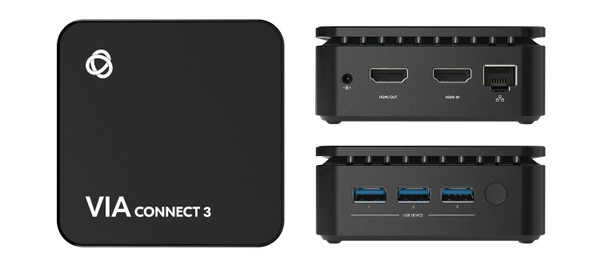

Bring laptop and mobile-device content to a shared meeting-room display with the Kramer VIA CONNECT3. It combines wireless presentation, a wired HDMI input, and access to compatible room USB equipment in one compact device. Participants can present together, compare documents, and use supported conferencing peripherals from their computers.
VIA CONNECT3 Features
- Share without passing a cable: Compatible AirPlay, Miracast, browser, and VIA connection methods let participants join from supported computers and mobile devices. The available method depends on the device and network setup.
- Compare four contributions: Show up to four participants on the main display at once, making it easier to review designs, spreadsheets, or classroom work together.
- Play 4K multimedia: The VIA app Multimedia feature supports video playback up to 4K. The published maximum HDMI input and output resolution is 4K at 30Hz.
- Connect a wired source: An HDMI input accommodates a computer, camera, or media source when a cable is preferred. This input does not accept HDCP-protected content.
- Use meeting-room peripherals: VIA Versa lets supported computers access compatible room cameras, microphones, and speakers wirelessly. Kramer lists tested devices and Teams and Zoom compatibility.
- Choose wired or wireless networking: Gigabit Ethernet and dual-band Wi-Fi support different room-network designs. Deployment settings include 802.1X authentication and a dynamic room code.
- Support collaboration beyond slides: Whiteboard, file sharing, chat, and viewing the main display help participants work with the material being presented.
- Manage multiple rooms: VIA Site Management on Cloud provides a management option for deployments with multiple VIA devices.
Specifications
| Manufacturer part number | 87-000890 |
|---|---|
| Maximum video resolution | 4K at 30Hz input and output |
| Wired video | 1 HDMI input; 1 HDMI output |
| USB connections | 3 USB 3.0 Type-A ports |
| Network | Gigabit LAN; dual-band Wi-Fi 802.11 ac/b/g/n |
| Simultaneous presenters | Up to 4 |
| Power | 12V DC; power adapter included |
| Operating temperature | 0 to 40°C |
| Shipping size (W × D × H) | 6.18 × 4.72 × 4.33 in |
| Shipping weight | 2.0 lb approx. |
Technical Questions and Answers
How many people can present at once?
Up to four participants can share content simultaneously on the main display.
Which wireless presentation methods are supported?
Kramer lists AirPlay, Miracast, browser-based joining, and the VIA application. Compatibility depends on the presenting device and deployment configuration.
Does every wireless connection deliver 4K?
The 4K streaming feature is specified for VIA app Multimedia playback. Do not assume every mirroring method delivers the same resolution or frame rate.
Can I connect an HDMI source directly?
Yes. The wired HDMI input supports up to 4K at 30Hz, but it does not support HDCP-protected content.
Can it use the room camera for a video meeting?
VIA Versa supports wireless access to compatible USB conferencing devices. Check the camera and conferencing software against Kramer’s compatibility guidance.
Does it require a wireless-only network?
No. It includes Gigabit Ethernet as well as dual-band Wi-Fi, so the room deployment can use a wired network connection.
How is the unit powered?
It uses a 12V DC supply. Kramer includes a power adapter with the device.
Can multiple VIA devices be managed together?
VIA CONNECT3 supports VIA Site Management on Cloud. Check the service requirements for the intended deployment.
Choosing the Right Product
What does the Kramer VIA CONNECT3 do?
It lets supported laptops and mobile devices share content on a room display, with collaboration tools, a wired HDMI input, and support for compatible room USB peripherals.
Is VIA CONNECT3 suitable for meeting rooms and classrooms?
Yes. Its four-presenter display capability suits group discussion, side-by-side review, training, and classroom sharing.
What should I check before installing VIA CONNECT3?
Confirm the display connection, network access, preferred presentation method, and compatibility of any camera, microphone, or speaker you plan to share.