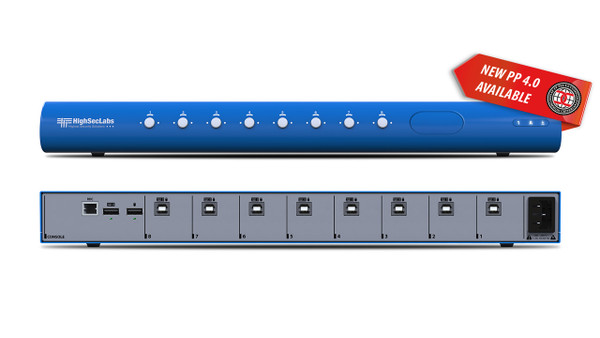

The Kramer SM80N-4 shares keyboard and mouse control across 8 computers while their displays remain connected directly to the computers. It switches supported peripherals rather than routing video.
SM80N-4 Detailed Features
- Control multiple computers with one keyboard and mouse. This 8-computer KM switch reduces duplicated input devices at an operator position. Users can work across several systems while keeping a familiar keyboard and mouse at the desk.
- Leave the computer displays connected directly. Video does not pass through this KM switch. Each computer retains its own monitor connections, allowing its information to remain visible while keyboard and mouse control moves elsewhere.
- Move between configured screen positions. Cursor-based switching supports a natural transition between computers when the pointer crosses configured display boundaries. Match the software layout to the physical monitor arrangement during setup.
- Configure a multi-monitor workspace. The manufacturer documents arrangements with up to four displays per computer. Extended and duplicated modes have configuration requirements; supported driver-based multi-monitor operation is Windows-specific.
- Reduce desk clutter without hiding information. A shared input-device set frees space while the directly connected screens remain available. This suits monitoring positions where several computer interfaces need to be visible at once.
- Help maintain host separation. Secure keyboard and mouse handling is intended to prevent the shared peripherals from becoming a data path between computers. Use the prescribed peripherals and settings for the selected security environment.
- Use the device status indicators. Front-panel lock-key indications help the operator check typing states such as Caps Lock. These are particularly useful when secure operation restricts normal two-way communication with the keyboard.
- Select peripherals by the exact model. USB and audio facilities vary within this KM family. Check this model’s connection table and supported-device requirements before planning smart-card readers, audio accessories, or other shared peripherals.
Specifications
| Manufacturer part number | CPN25357 |
|---|---|
| No. of Sources | 8 |
| CONSOLE PORTS — Mouse and Keyboard | USB Type A |
| CONSOLE PORTS — Audio Jack | N/A |
| CONSOLE PORTS — fUSB Port | N/A |
| COMPUTER PORTS — Mouse and Keyboard | USB Type B |
| COMPUTER PORTS — Audio Jack | N/A |
| COMPUTER PORTS — fUSB Port | N/A |
| PHYSICAL — Dimensions | 440 x 192 x 48 mm / 17.3 x 7.5 x 1.9 inches |
| PHYSICAL — Weight | 2.4 kg (5.3 lbs) |
| POWER — Power Requirements | 35W Max |
| POWER — AC Input | 100 to 240V AC |
| POWER — Power Type | Internal |
| ENVIRONMENTAL — Operating Temperature | 32°F to 104°F (0°C to 40°C) |
| ENVIRONMENTAL — Storage Temperature | -4°F to 140°F (-20°C to 60°C) |
| ENVIRONMENTAL — Humidity | 0%-80% RH, non-condensing |
| SOFTWARE — Supported OS | Windows, Linux, Mac |
| GENERAL INFO — Manufactured | BAA & TAA Compliant |
| GENERAL INFO — Product life-cycle | 10 years |
Technical Questions and Answers
What does the SM80N-4 do?
The Kramer SM80N-4 shares keyboard and mouse control across 8 computers while their displays remain connected directly to the computers. It switches supported peripherals rather than routing video.
How many computers can it connect?
8
What does the console mouse and keyboard connection support?
USB Type A
What is provided for computer-side mouse and keyboard?
USB Type B
What is specified for dimensions?
440 x 192 x 48 mm / 17.3 x 7.5 x 1.9 inches
What are the power requirements requirements?
35W Max
What are the ac input requirements?
100 to 240V AC
What are the power type requirements?
Internal
Choosing the Right Product
What is the Kramer SM80N-4 used for?
It is used for multi-computer desks with continuously connected displays. Shares keyboard and mouse control across 8 computers while their displays remain connected directly to the computers. It switches supported peripherals rather than routing video.
Who should choose the SM80N-4?
Choose this model when your project needs multi-computer desks with continuously connected displays. Compare the model-specific connections and specifications above with the equipment in your system.
What should I check before ordering the SM80N-4?
Confirm manufacturer part CPN25357, the required connections and the installation requirements. Use the linked documentation to check compatible equipment and required accessories.