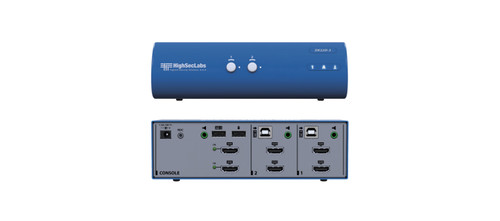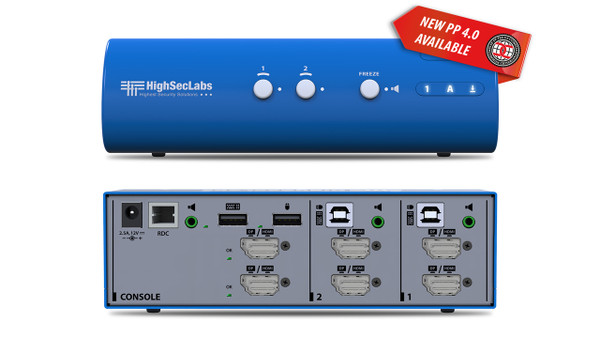

The Kramer DK22PH-4 lets one operator work with two computers using a shared keyboard, mouse, two monitors, and speaker connection. Its secure design supports workstations where computers must remain separated while sharing desktop equipment.
DK22PH-4 Detailed Features
- Control two computers from one workspace. Reduce duplicate peripherals and desk clutter while retaining access to both systems. This arrangement is useful for operators who regularly move between separate computing environments.
- Share a dual-monitor workstation. Dual-head operation supports computers with two displays, giving the selected computer more screen space for applications, documents, and monitoring tasks.
- Display detailed content at up to 4K60. Supports resolutions up to 3840 × 2160 at 60Hz for clear text, detailed graphics, and smooth screen movement.
- Connect HDMI and DisplayPort equipment. Combination video ports accept either connector format, allowing mixed HDMI and DisplayPort sources and displays without external format converters.
- Maintain separation between connected computers. Dedicated video isolation, keyboard/mouse emulation, and controlled one-way signal paths help reduce opportunities for information transfer through shared peripherals.
- Select the active computer from the front panel. Illuminated channel buttons provide direct control and show which computer is selected, helping operators confirm their working system before entering information.
- Keep audio on one computer while switching control. The audio-freeze function holds the speaker connection on a chosen computer while the other peripherals switch channels. For example, an operator can continue listening to one system while working on the other.
- Check peripheral status during setup. Keyboard and mouse indicators distinguish an approved device from a rejected or missing device. Display indicators report whether monitor identification information has been received, helping installers identify connection problems.
- Detect tampering and startup faults. An active anti-tampering system disables the unit if mechanical intrusion is detected. Startup self-tests also prevent normal operation when a fault is found.
Compatibility and Installation Notes
Use a supported wired keyboard; wireless keyboards are not supported. Monitor identification is read during startup, so restart the KVM after changing displays. This model has no dedicated filtered USB port for sharing smart-card readers or other USB accessories.
Specifications
| Manufacturer part number | CPN19254 |
|---|---|
| No. of Sources | 2 |
| CONSOLE PORTS — Displays | 2 x DP 1.2/HDMI 2.0 |
| CONSOLE PORTS — Max Resolution (Input & Output) | Supporting UHD 4K resolutions up to 3840x2160 @ 60 Hz |
| CONSOLE PORTS — Mouse and Keyboard | USB Type A |
| CONSOLE PORTS — Audio Jack | 3.5 mm Jack |
| CONSOLE PORTS — fUSB Port | N/A |
| COMPUTER PORTS — Display Type | 2 x DP 1.2/HDMI 2.0 |
| COMPUTER PORTS — Mouse and Keyboard | USB Type B |
| COMPUTER PORTS — Audio Jack | 3.5 mm Jack |
| COMPUTER PORTS — fUSB Ports | N/A |
| PHYSICAL — Dimensions | 177 x 92 x 50 mm / 6.9 x 3.6 x 1.9 inches |
| PHYSICAL — Weight | 0.64 kg (1.4 lbs) |
| POWER — Power Requirements | 12V DC, 2.5A |
| POWER — AC Input | 100 to 240V AC |
| POWER — Power Type | External |
| ENVIRONMENTAL — Operating Temperature | 32° to 104° F (0° to 40° C) |
| ENVIRONMENTAL — Storage Temperature | -4° to 140° F (-20° to 60° C) |
| ENVIRONMENTAL — Humidity | 0-80% RH, non-condensing |
| SOFTWARE — Supported OS | Windows, Linux, Mac |
| GENERAL INFO — Manufactured | BAA & TAA Compliant |
| GENERAL INFO — Product life-cycle | 10 years |
Technical Questions and Answers
What does the DK22PH-4 do?
The Kramer DK22PH-4 lets one operator share a keyboard, mouse and supported display connections across 2 computers. Dual-head operation supports a two-display workstation.
How many computers can it connect?
2
What does the console displays connection support?
2 x DP 1.2/HDMI 2.0
What video resolution does it support?
Supporting UHD 4K resolutions up to 3840x2160 @ 60 Hz
What does the console mouse and keyboard connection support?
USB Type A
What does the console audio jack connection support?
3.5 mm Jack
What is provided for computer-side display type?
2 x DP 1.2/HDMI 2.0
What is provided for computer-side mouse and keyboard?
USB Type B
Choosing the Right Product
What is the Kramer DK22PH-4 used for?
It is used for workstations that share an operator console across several computers. Lets one operator share a keyboard, mouse and supported display connections across 2 computers. Dual-head operation supports a two-display workstation.
Who should choose the DK22PH-4?
Choose this model when your project needs workstations that share an operator console across several computers. Compare the model-specific connections and specifications above with the equipment in your system.
What should I check before ordering the DK22PH-4?
Confirm manufacturer part CPN19254, the required connections and the installation requirements. Use the linked documentation to check compatible equipment and required accessories.