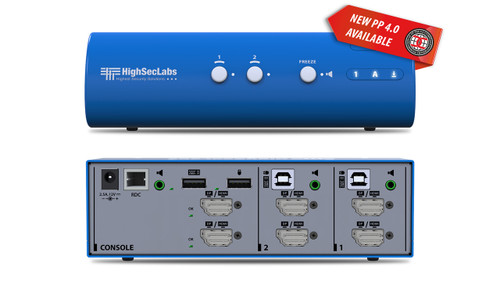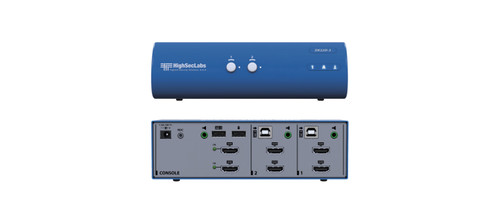




The Kramer DK22P-N lets one operator share a keyboard, mouse and supported display connections across 2 computers. Dual-head operation supports a two-display workstation.
DK22P-N Detailed Features
- Operate 2 computers from one console. A shared keyboard and mouse reduce the need for a separate peripheral set at every computer. This suits an operator who regularly moves between 2 systems at one workstation.
- Share a two-monitor desktop. Dual-head operation provides two display connections for the selected computer. This gives users space for two applications or a wider desktop, subject to the computer and display configuration.
- Work with detailed Ultra HD content. The model supports video up to 3840 × 2160 at 30Hz. Select a supported source format and compatible displays and cables to achieve the intended resolution and refresh rate.
- Connect DisplayPort video. The model's DisplayPort video connections determine the source and display cabling needed. Check the exact connector arrangement before ordering cables for all computer channels.
- Keep audio on a chosen computer. Audio-freeze operation lets the operator continue listening to one system while switching the other workstation peripherals. This can be useful when monitoring a call or an audio feed during another task.
- Support a separate-display KM arrangement. The manufacturer also documents keyboard/mouse sharing with computers connected to their own displays. Check the required software and configuration before setting up a multi-display workflow.
- Use supported cross-computer copy and paste. The manufacturer lists text and file transfer between connected computers. Review software requirements and the intended data-sharing workflow before enabling this function in the workstation.
- Keep the desktop installation compact. The small-form-factor design puts computer selection at the workstation without requiring separate keyboards and mice for each system. Allow access to the rear connections when choosing its position.
Specifications
| Manufacturer part number | 22-00003590 |
|---|---|
| Console Ports | 2 DisplayPort 1.2 connectors |
| Console Ports | 2 USB–A connectors for keyboard and mouse |
| Console Ports | 1 3.5mm mini jack for unbalanced stereo audio |
| Console Ports | 1 3.5mm mini jack for microphone |
| Console Ports | 1 3.5mm mini jack connector for control (RDC). |
| Computer Ports | 4 DisplayPort 1.2 connectors |
| Computer Ports | 2 USB–B connectors for keyboard and mouse |
| Computer Ports | 2 3.5mm mini jacks for unbalanced stereo audio |
| Computer Ports | 2 3.5mm mini jacks for microphone. |
| Max Resolution | 4K30 UHD (3840X2160 @30Hz). |
| Power Consumption | 12V DC, 1.5A. |
| AC Input | 100 to 240V AC. |
| Power Type | External. |
| Operating Temperature | 32° to 104°F (0° to 40°C). |
| Storage Temperature | –4° to 140°F (–20° to 60°C). |
| Humidity | 0–80% RH, non–condensing. |
| Supported OS | Windows, Linux, Mac. |
| Product Life-cycle | 10 years. |
| Product Dimensions — PRODUCT DIMENSION | 17.70cm x 9.20cm x 5.00cm (6.97" x 3.62" x 1.97" ) W, D, H |
| Product Weight | 0.6kg (1.4lbs) approx. |
| Shipping Dimensions — SHIPPING DIMENSION | 24.50cm x 20.50cm x 8.50cm (9.65" x 8.07" x 3.35" ) W, D, H |
| Shipping Weight | 0.9kg (2.1lbs) approx. |
Technical Questions and Answers
What does the DK22P-N do?
The Kramer DK22P-N lets one operator share a keyboard, mouse and supported display connections across 2 computers. Dual-head operation supports a two-display workstation.
What does the console console ports connection support?
2 DisplayPort 1.2 connectors
What is provided for computer-side computer ports?
4 DisplayPort 1.2 connectors
What video resolution does it support?
4K30 UHD (3840X2160 @30Hz).
What are the power consumption requirements?
12V DC, 1.5A.
What are the ac input requirements?
100 to 240V AC.
What are the power type requirements?
External.
What is specified for operating temperature?
32° to 104°F (0° to 40°C).
Choosing the Right Product
What is the Kramer DK22P-N used for?
It is used for workstations that share an operator console across several computers. Lets one operator share a keyboard, mouse and supported display connections across 2 computers. Dual-head operation supports a two-display workstation.
Who should choose the DK22P-N?
Choose this model when your project needs workstations that share an operator console across several computers. Compare the model-specific connections and specifications above with the equipment in your system.
What should I check before ordering the DK22P-N?
Confirm manufacturer part 22-00003590, the required connections and the installation requirements. Use the linked documentation to check compatible equipment and required accessories.