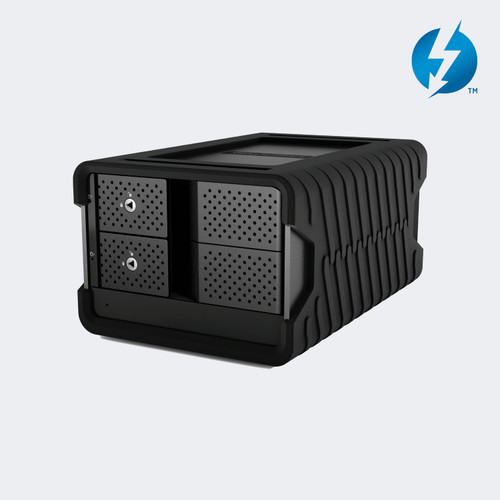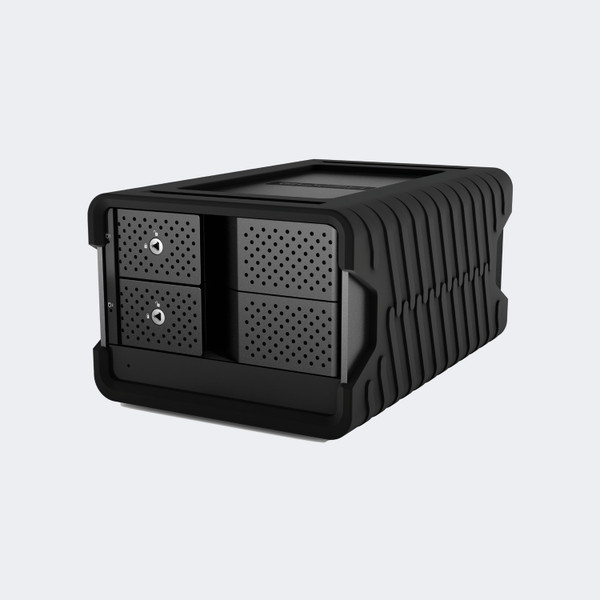


The Glyph Blackbox PRO RAID 60TB USB-C Dual-Drive Desktop Hard Drive connects 60TB of nominal combined hard-drive storage to your workstation over USB-C. Model BBPR60000RAID uses hardware RAID to give you a choice between striped performance, mirrored storage, independent disks, and a spanning volume. It is a desktop system for keeping large production files close to your editing or recording computer.
A 10Gb USB-C interface and enterprise-class 7,200 RPM disks support transfer speeds up to 550 MB/s. This configuration has no card-reader hub. It arrives in RAID 0, formatted for macOS, and can be reformatted for Windows.
The included external power supply powers the enclosure, while an intelligent fan provides cooling. Choose your storage mode before loading projects: changing RAID modes destroys existing data, and mirrored storage trades half the nominal capacity for disk redundancy.
Glyph BBPR60000RAID Features
- 60TB combined drive capacity. The BBPR60000RAID brings two hard drives together in one desktop enclosure, giving you 60TB of nominal combined storage for media collections and project files. Available capacity depends on your RAID mode; mirroring uses half the combined capacity.
- Up to 550 MB/s transfers. Glyph rates the Blackbox PRO RAID for transfer speeds up to 550 MB/s, helping you move large production files between your workstation and external storage. This is a maximum rating, rather than a guaranteed speed for every file or operating mode.
- 10Gb USB-C host connection. Connect the drive through its USB-C Gen 2 interface for a direct workstation storage connection. The included USB-C and USB-A connection cables accommodate different host ports, while slower USB connections limit the bandwidth available to your transfers.
- Hardware RAID with four modes. Choose RAID 0, RAID 1, JBOD, or SPAN using the built-in controller, without installing software RAID. You can prioritize striped performance, mirrored storage, separate disks, or a combined spanning volume according to how your project storage is organized.
- RAID 0 configured at the factory. The drive arrives in striped mode so both disks contribute to one large volume and share the data workload. RAID 0 provides no redundancy: a single disk failure can compromise the volume, so keep another copy of important projects.
- RAID 1 for mirrored storage. Switch to RAID 1 when you want the same data written to both disks. Mirroring leaves approximately 30TB of nominal capacity on this 60TB model and can preserve access after one disk fails; it does not replace a separate backup.
- Enterprise-class 7,200 RPM disks. The enclosure uses enterprise-class rotating hard drives and an intelligent cooling fan for desktop production work. Plan for an externally powered disk system at your workstation, with room around the enclosure for ventilation during sustained file transfers.
- Mac formatting with Windows support. The Blackbox PRO RAID comes formatted for macOS and supports Time Machine. Windows users can reformat it with the operating system’s disk tools; save any existing files first, because reformatting and RAID-mode changes erase data on the array.
Where the BBPR60000RAID Fits
Post-production desks: Keep footage, audio, and project assets on one directly attached desktop system. Choose the RAID mode to match your capacity and redundancy requirements before you transfer your working library.
Recording studios: Use the USB-C connection for large session collections and production assets. The externally powered enclosure stays at your workstation rather than relying on power from the computer’s USB port.
Photography workstations: Consolidate image libraries and exports on a 60TB nominal array. Maintain a separate backup, especially when using the factory RAID 0 configuration.
Mac backup workflows: Use the manufacturer’s Time Machine compatibility for a desktop backup destination. If you change the RAID mode or filesystem, plan the configuration before copying files to the drive.
Why not buy this Glyph BBPR60000RAID Desktop RAID Drive today?
Glyph BBPR60000RAID Specifications
- Model: BBPR60000RAID
- Capacity: 60TB nominal combined capacity; approximately 30TB nominal in RAID 1
- Storage type: Dual enterprise-class 7,200 RPM hard disk drives
- Host interface: 1 x USB-C, 10Gb/s Gen 2 (manufacturer labels USB 3.1 Gen 2)
- Maximum transfer rate: Up to 550 MB/s
- RAID modes: RAID 0, RAID 1, JBOD (CLEAR), and SPAN (BIG)
- Factory RAID mode: RAID 0
- Operating system support: Formatted for macOS; Windows via reformat
- Power: External power supply
- Cooling: Intelligent fan
- Dimensions: 8.25 x 5.5 x 4.25 inches (manufacturer order)
- Manufacturer variant weight: 4.99 kg (manufacturer commerce weight; not identified as net weight)
What's in the Box
- 1 x Glyph BBPR60000RAID 60TB Desktop RAID Drive
- 1 x USB-C to USB-C cable
- 1 x USB-C to USB-A cable
- 1 x Rugged removable cover
- 1 x External power supply
Why not buy this Glyph BBPR60000RAID Desktop RAID Drive today?
BBPR60000RAID Blackbox PRO RAID USB-C User Guide (PDF)
Need help with the manual? Call 833-WOLFPACK (833-965-3722).
Why not buy this Glyph BBPR60000RAID Desktop RAID Drive today?
Does the BBPR60000RAID provide 60TB of combined storage?
Yes. BBPR60000RAID is the 60TB model. That is nominal combined drive capacity; RAID mode and formatting determine the capacity available to your computer.
Does this desktop RAID drive use a 10Gb USB-C connection?
Yes. Its USB-C Gen 2 host interface operates at up to 10Gb/s. Glyph rates the storage system itself for transfers up to 550 MB/s, so the interface rate is not the disk transfer speed.
Can I select RAID 0, RAID 1, JBOD, or SPAN?
Yes. The built-in hardware controller supports all four modes without software RAID. Follow the manufacturer’s configuration procedure and back up your files before changing modes.
Does RAID 0 protect my files against a drive failure?
No. RAID 0 stripes data across both drives without redundancy. A drive failure can compromise the combined volume, so retain a separate backup.
Will RAID 1 reduce the available capacity?
Yes. RAID 1 mirrors the same data onto both drives, leaving half the combined nominal capacity. On this 60TB model, that means approximately 30TB before formatting.
Can I use this drive with Windows?
Yes. The drive supports Windows after reformatting. It arrives formatted for macOS, and the formatting procedure erases any existing data.
Does the BBPR60000RAID include an SD card reader or USB hub?
No. This is the USB-C model without the optional card-reader and hub assembly. Do not select it expecting the CFast, SD, or peripheral ports offered on hub variants.
Are both USB connection cables included?
Yes. Glyph lists a USB-C to USB-C cable and a USB-C to USB-A cable in the package. The package also includes the drive, removable cover, and external power supply.
Can this desktop drive operate without its external power supply?
No. The BBPR60000RAID uses an external power supply, which Glyph includes. Plan for a power connection at your editing desk or storage workstation.
Does this drive include a three-year hardware warranty?
Yes. Glyph provides three years of hardware coverage, two years of Level-1 data recovery, and one year of advance replacement. Recovery is not guaranteed, and the manual limits advance replacement to the 48 continental U.S. states.
Why not buy this Glyph BBPR60000RAID Desktop RAID Drive today?
HDTV Supply supplies desktop storage for recording studios, post-production facilities, schools, and corporate media departments.
This model connects to a computer through USB-C Gen 2 and supports USB 3.0 connections. It is formatted for macOS, is Time Machine compatible, and supports Windows after reformatting. It provides directly attached file storage for your workstation; select the non-hub USB-C configuration when comparing this model with other Blackbox PRO RAID versions.
Why not buy this Glyph BBPR60000RAID Desktop RAID Drive today?
This Glyph BBPR60000RAID Desktop RAID Drive includes a 3-year manufacturer hardware warranty, 2 years of Level-1 data recovery, and 1 year of advance replacement. Recovery attempts are not guaranteed; advance replacement is limited to the 48 continental U.S. states under the manual’s terms. Questions? Call 833-WOLFPACK (833-965-3722).