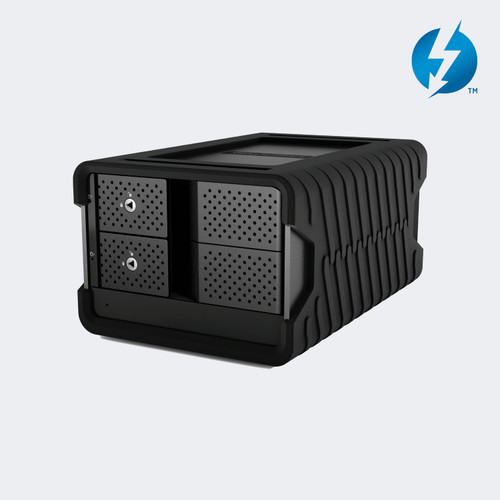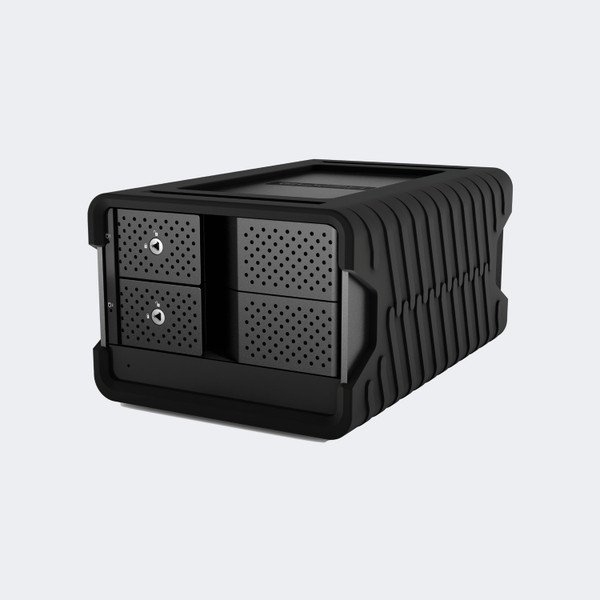

The Glyph Blackbox PRO RAID 56TB USB-C 10Gbps Desktop Hard Drive Array (BBPR56000RAID) brings high-capacity, dual-drive hardware RAID storage to your desktop through a 10Gbps USB-C connection. You can use its 56TB rated capacity for creative project files, then select striping, mirroring, independent disks, or spanning to match the way you work and the redundancy you need.
Enterprise-class 7200 RPM hard drives and a built-in RAID controller provide the storage foundation. Glyph rates the USB-C array at up to 550 MB/s. It is formatted for macOS, supports Time Machine, and can be reformatted for Windows before you load your files.
This is the non-hub USB-C configuration. It uses external power, an aluminum enclosure, and fan cooling. Before committing footage or session files to the array, choose the RAID mode and establish a separate backup of material you cannot replace.
Glyph BBPR56000RAID Features
- 56TB total capacity. The BBPR56000RAID gives you 56TB of rated storage before formatting and RAID overhead. Use that space to consolidate large creative projects on one desktop array, and choose your RAID mode before deciding how much working capacity your workflow requires.
- 10Gbps USB-C connection. Connect the array to your computer through its USB-C host interface. Glyph rates the USB model at up to 550 MB/s, giving you a defined performance ceiling for planning media transfers rather than treating the interface bandwidth as a guaranteed disk speed.
- Hardware RAID 0. The array arrives configured for striping, distributing data across both internal drives for performance and combined capacity. You can begin with the default configuration when speed matters, but a single drive failure can compromise the array, so retain a separate backup.
- RAID 1 mirroring. Select mirrored operation when maintaining duplicate data across the two drives is more useful than maximizing capacity. RAID 1 reduces the rated usable capacity to half the total, or 28TB before formatting, and protects against a drive failure rather than every cause of data loss.
- JBOD and SPAN alternatives. The built-in controller also supports CLEAR, which mounts the drives independently, and BIG, which combines them sequentially into one volume. These options let you choose separate disks or a continuous volume without relying on a software RAID application.
- 7200 RPM enterprise drives. This 56TB configuration uses enterprise-class hard drives running at 7200 RPM. It suits a desktop storage workflow where you want substantial disk capacity for footage, photographs, or audio sessions; it remains mechanical hard-drive storage rather than an NVMe SSD.
- macOS formatting with Windows support. The array is formatted for macOS and supports Time Machine out of the box. Windows users can reformat it before use, so you can choose the host platform deliberately; reformatting erases existing data and should happen before transferring your projects.
- Cooled desktop enclosure. An aluminum shell and intelligent cooling fan help manage heat during use, while the removable cover surrounds the enclosure. The BBPR56000RAID uses an external power supply, so plan for both a host connection and a powered desktop position when arranging your workspace.
Where the BBPR56000RAID Fits
Video editing rooms: Keep project media on a dedicated desktop array connected to your editing computer. RAID 0 emphasizes throughput and capacity; mirrored operation trades capacity for drive redundancy.
Photography studios: Consolidate image libraries and project folders on high-capacity hard drives. Select your preferred disk layout before loading the library so a later mode change does not interrupt your workflow.
Audio production spaces: Store session folders and completed productions on the USB-C array. Include space for the externally powered enclosure in your workstation layout and maintain a separate backup of original recordings.
Mac backup workstations: Use the documented Time Machine compatibility for a Mac-based backup workflow. Confirm that the usable capacity in your chosen RAID mode is sufficient for the files you intend to protect.
Why not buy this Glyph BBPR56000RAID Desktop RAID today?
Glyph BBPR56000RAID Specifications
- Model: BBPR56000RAID
- Storage type: Dual-drive desktop hardware RAID
- Rated total capacity: 56TB; RAID 1 uses half the total before formatting
- Host interface: 1 x USB-C, Gen 2, 10Gbps
- Maximum transfer rate: Up to 550 MB/s
- Drive class: Enterprise-class HDDs, 7200 RPM
- Modes: RAID 0 (default), RAID 1, CLEAR / JBOD, BIG / SPAN
- Optional hub: Not included in this SKU
- Operating systems: Preformatted for macOS; Windows via reformat
- Power: External power supply
- Cooling: Intelligent fan and aluminum enclosure
- Dimensions: 8.25 x 5.5 x 4.25 inches
What's in the Box
- 1 x Glyph BBPR56000RAID Desktop RAID with two drives
- 1 x USB-C to USB-C cable
- 1 x USB-C to USB-A cable
- 1 x Rugged removable cover
- 1 x External power supply
Why not buy this Glyph BBPR56000RAID Desktop RAID today?
Blackbox PRO RAID USB-C User Guide (PDF)
Need help with the BBPR56000RAID manual or RAID setup? Call 833-WOLFPACK (833-965-3722).
Why not buy this Glyph BBPR56000RAID Desktop RAID today?
Does the BBPR56000RAID use a 10Gbps USB-C interface?
Yes. The BBPR56000RAID has a USB-C Gen 2 host interface rated at 10Gbps. Glyph specifies transfer speeds up to 550 MB/s for the USB RAID family.
Does this 56TB array arrive configured in RAID 0?
Yes. RAID 0 is the default configuration and combines the drives for capacity and performance. It provides no drive redundancy, so keep another copy of important files.
Can RAID 1 provide 56TB of mirrored capacity?
No. RAID 1 uses half the total capacity for mirrored data, leaving 28TB before formatting on this 56TB configuration. Choose the mode according to your capacity and redundancy needs.
Can I mount the internal drives separately?
Yes. CLEAR, also called JBOD, makes the two drives available independently. BIG or SPAN instead presents one logical volume and fills the first drive before the second.
Can I change RAID modes without erasing the data?
No. Glyph states that changing the RAID mode erases previously stored data. Back up the contents before using the rear configuration pins and SET button.
Is the array ready for macOS and Time Machine?
Yes. Glyph supplies the USB-C Blackbox PRO RAID formatted for macOS and describes it as Time Machine compatible. Windows use requires reformatting first.
Is this the Thunderbolt 3 model with daisy chaining?
No. BBPR56000RAID is the single-host-port USB-C model. The Thunderbolt version is a separate configuration with different rear connections.
Are CFast and SD card readers included in this SKU?
No. The official catalog identifies BBPR56000RAID as the 56TB configuration without the optional hub. Choose another configuration if integrated card readers are required.
Are connection cables and a power supply included?
Yes. Glyph lists USB-C to USB-C and USB-C to USB-A cables, a removable cover, and an external power supply with the drive. The array requires external power for operation.
Does this desktop RAID include a three-year hardware warranty?
Yes. Glyph provides three years of hardware coverage, two years of Level-1 data recovery attempts, and one year of advanced replacement. Recovery success is not guaranteed, and advanced replacement is limited to the 48 continental U.S. states.
Why not buy this Glyph BBPR56000RAID Desktop RAID today?
HDTV Supply supplies desktop storage arrays for post-production rooms, recording studios, schools, houses of worship, and corporate media teams.
The BBPR56000RAID connects to a computer over USB-C Gen 2 and is compatible with USB 3.0. Glyph also lists compatibility with Thunderbolt 3-equipped computers; this remains a USB storage device. Use the included cable appropriate to your host, and reformat for Windows before storing data.
Why not buy this Glyph BBPR56000RAID Desktop RAID today?
This Glyph BBPR56000RAID Desktop RAID includes a 3-year manufacturer hardware warranty, including cables. Coverage also includes two years of Level-1 data recovery attempts and one year of advanced replacement in the 48 continental U.S. states. Data recovery is not guaranteed. Questions? Call 833-WOLFPACK (833-965-3722).