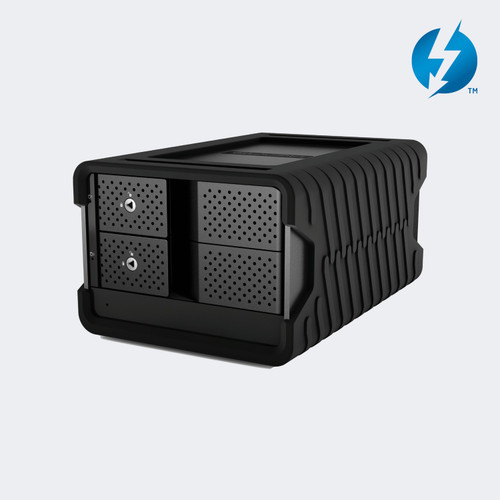
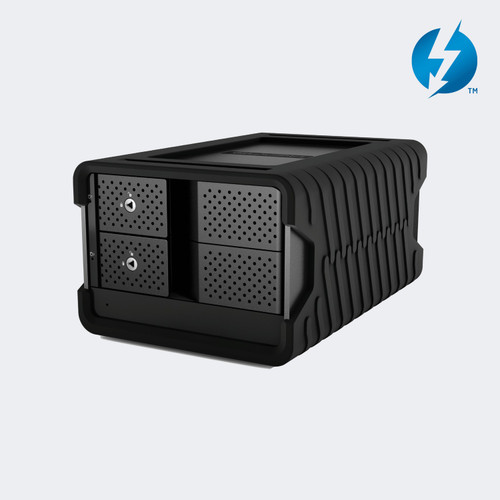
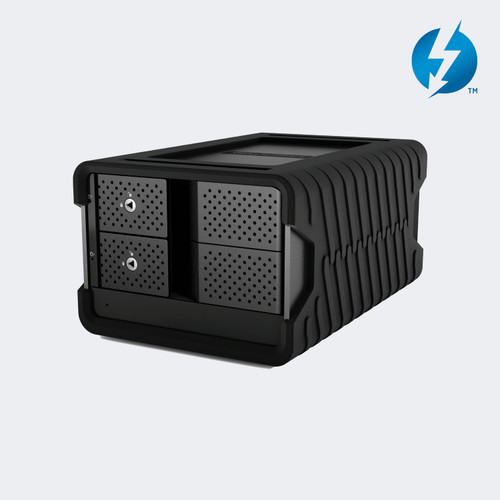
The Glyph Blackbox PRO RAID 32TB Thunderbolt 3 2-Bay Desktop RAID Drive is a hardware RAID array with two 16TB enterprise-class 7,200 RPM drives, giving you 32TB of fast storage for editing, ingest, and backup over a single Thunderbolt 3 cable.
The BBPR32RDTB3 is the version without the card reader and hub. It connects to the host over Thunderbolt 3 (40Gb), reaches transfer speeds up to 550 MB/s, and arrives formatted for macOS and ready for Time Machine. Windows users can reformat the drive for their system.
A second Thunderbolt 3 port lets you daisy-chain more devices, and a built-in DisplayPort output drives a 4K monitor. Power comes from an external power supply, and a rugged removable cover ships with the drive.
Glyph Blackbox PRO RAID Features
- Two 16TB enterprise-class drives. The 32TB model holds two 16TB 7,200 RPM enterprise-class hard drives in a 2-bay enclosure. Enterprise drives are built for heavy, continuous use, which suits editing bays and ingest stations that read and write all day.
- Hardware RAID without software. RAID 0, RAID 1, JBOD, and SPAN are set on the drive itself, so you do not install a RAID utility. Use RAID 0 for the full 32TB at top speed, or RAID 1 to mirror the two drives for redundancy at about half the space.
- Thunderbolt 3 at 40Gb. The Thunderbolt 3 connection lets the pair of drives run at up to 550 MB/s, which is enough to work with high-bitrate camera files directly from the array. A Thunderbolt 3 cable is included, so you can connect on day one.
- Two Thunderbolt 3 ports for daisy-chaining. One port connects to your computer and the second passes the connection on, so you can chain up to 5 additional devices. This keeps a laptop or small workstation tidy when a monitor, dock, and extra storage share one port.
- Built-in DisplayPort output. A DisplayPort connector on the rear supports a 4K monitor, so the drive can sit between a computer and a display. You do not need a separate dock just to add a screen, though the drive does not replace a full video interface.
- Aluminum shell that works as a heatsink. The rugged aluminum shell draws heat away from the drives, and an intelligent quiet fan handles the rest. That keeps noise low in an edit suite or studio while the drives work through long copy and render jobs.
- Rugged removable cover. The included cover protects the drive bays and front of the enclosure while you carry the array between sets, edit rooms, and client sites. Remove it when the drive stays at a desk and you want direct access to the front.
- Formatted for macOS, ready for Windows. The drive arrives formatted for macOS and ready for Time Machine backups. Windows computers can use it after you reformat the drive. Reformatting erases the data, so do it before you copy anything onto the array.
Where the BBPR32RDTB3 Fits
Video editing suites: Hold project media and cache files on a 32TB RAID 0 volume that keeps up with multi-stream editing from a Thunderbolt 3 Mac or PC.
On-set data management: Copy camera cards to a two-drive array, then mirror the files in RAID 1 mode for a second copy before cards are cleared.
Photo and audio studios: Keep sessions, libraries, and Time Machine backups on one drive with room to grow beyond a laptop's internal storage.
Broadcast and house of worship workstations: Store recorded services and show archives on a quiet desktop drive that chains neatly behind a single Thunderbolt 3 port.
Why not buy this Glyph BBPR32RDTB3 Blackbox PRO RAID today?
Glyph Blackbox PRO RAID 32TB Specifications
- Model: BBPR32RDTB3
- UPC: 691450004689
- Type: 2-bay desktop hardware RAID drive, without card reader and hub
- Capacity: 32TB (2 x 16TB)
- Drives: Enterprise-class, 7,200 RPM
- RAID modes: RAID 0, RAID 1, JBOD, SPAN (no software required)
- Host interface: Thunderbolt 3 (40Gb)
- Thunderbolt 3 ports: 2, with daisy-chaining of up to 5 additional devices
- Video output: 1 x DisplayPort, for a 4K monitor
- Transfer speed: Up to 550 MB/s
- Cooling: Intelligent quiet fan, aluminum shell acts as a heatsink
- Power: External power supply
- Format: Formatted for macOS, Time Machine ready, Windows after reformatting
- Dimensions: 8.25 x 5.5 x 4.25 in (drive)
- Weight: 4.99 kg (about 11 lb)
- Warranty: 3-year hardware, 2-year Level-1 data recovery, 1-year advance replacement
What's in the Box
- 1 x Glyph Blackbox PRO RAID 32TB Thunderbolt 3 Desktop Drive
- 1 x Thunderbolt 3 cable
- 1 x Rugged removable cover
- 1 x External power supply
Why not buy this Glyph BBPR32RDTB3 Blackbox PRO RAID today?
Blackbox PRO RAID Thunderbolt 3 Product Document (PDF)
Need more help? Call 833-WOLFPACK (833-965-3722) and we'll email what you need.
Why not buy this Glyph BBPR32RDTB3 Blackbox PRO RAID today?
Does the BBPR32RDTB3 include the card reader and hub?
No. The BBPR32RDTB3 is the drive-only version. Glyph sells a separate card reader and hub version of the 32TB drive under part number BBPR32RDTB3HUB.
Which RAID modes does the Glyph Blackbox PRO RAID support?
Yes, it supports RAID 0, RAID 1, JBOD, and SPAN. These are hardware modes set on the drive, so you do not need to install software to use them.
How much usable space do I get with the 32TB model?
The BBPR32RDTB3 holds two 16TB drives. In RAID 0 you use the full 32TB, while RAID 1 mirrors the drives, so you get about half of that in exchange for redundancy.
How fast is the Blackbox PRO RAID over Thunderbolt 3?
Glyph rates it at up to 550 MB/s over its Thunderbolt 3 (40Gb) connection. Real speeds depend on the RAID mode, the files you copy, and your computer.
Can I use the BBPR32RDTB3 with a Windows computer?
Yes. The drive is formatted for macOS, and Windows computers can use it after you reformat the drive. Reformatting erases the contents, so do it before you store files.
Can I daisy-chain other devices from the Blackbox PRO RAID?
Yes. The drive has two Thunderbolt 3 ports, and Glyph lists daisy-chaining of up to 5 additional devices from it.
Can I connect a monitor to the BBPR32RDTB3?
Yes. A built-in DisplayPort output supports a 4K monitor.
What warranty comes with the BBPR32RDTB3?
Yes, it is covered by Glyph's 3-year hardware warranty, which includes the cables. It also carries 2 years of Level-1 data recovery and 1 year of advance replacement.
What comes in the box with the Glyph Blackbox PRO RAID 32TB?
You get the Blackbox PRO RAID desktop drive, a Thunderbolt 3 cable, a rugged removable cover, and an external power supply.
How is the 32TB model different from the other Blackbox PRO RAID capacities?
The enclosure, ports, and features are the same across the Thunderbolt 3 family, which runs from 16TB to 60TB. The BBPR32RDTB3 is the 32TB drive-only version, and the hub versions add a card reader.
Why not buy this Glyph BBPR32RDTB3 Blackbox PRO RAID today?
HDTV Supply supplies desktop RAID storage for video editing suites, broadcast facilities, houses of worship, schools, production companies, and on-set data management.
The Blackbox PRO RAID connects over Thunderbolt 3 (40Gb), arrives formatted for macOS with Time Machine support, and works with Windows computers after reformatting. A DisplayPort output supports a 4K monitor.
Why not buy this Glyph BBPR32RDTB3 Blackbox PRO RAID today?
This Glyph BBPR32RDTB3 Blackbox PRO RAID includes a 3-year manufacturer hardware warranty, plus 2 years of Level-1 data recovery and 1 year of advance replacement. Questions? Call 833-WOLFPACK (833-965-3722).