




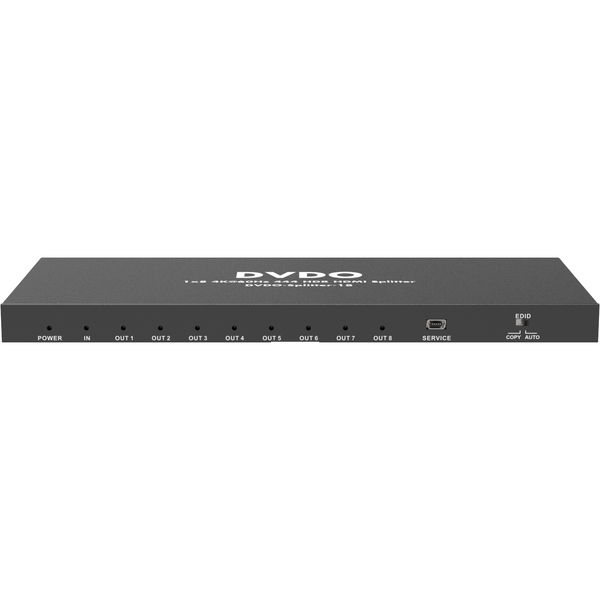
This DVDO Splitter-18 4K HDMI 1-8 Splitter with HDR that can reliably distribute one HDMI source signal to eight HDMI Displays.
The DVDO Splitter-18 is a high-performance HDMI splitter that can distribute a single HDMI input signal to up to 8 HDMI output displays. It supports resolutions up to 4K@60Hz (YUV 4:4:4) and HDCP 2.2, making it ideal for use with a variety of devices, including 4K TVs, projectors, and video game consoles.
DVDO Splitter-18 4K HDMI 1-8 Splitter with HDR Features:
- HDMI 2.0b, HDCP 2.2 compliant
- Supports 18Gbps bandwidth
- Supports resolution up to 4K@60Hz 4:4:4
- Supports HDR function
- Supports COPY / AUTO EDID control
- Compact design for easy and flexible installation
Why not buy this DVDO Splitter-18 4K HDMI 1-8 Splitter with HDR today?
HDTV Supply partners with DVDO to sell and support all DVDO products
Why not buy this DVDO Splitter-18 4K HDMI 1-8 Splitter with HDR today?
Can this splitter send the same HDMI signal to all eight outputs at once?
A: Yes — the DVDO-Splitter-18 distributes a single HDMI input synchronously to all eight HDMI outputs.
Does this splitter handle HDCP-protected content?
A: Yes — the unit is HDCP 2.2 compliant.
Are there status indicators to show power, input, and outputs?
A: Yes — the front-panel LEDs show power, an active HDMI IN, and active HDMI OUT ports.
Is there a way to update firmware on this splitter?
A: Yes — the unit has a SERVICE micro USB port designated for firmware updates.
Does the manual recommend surge protection for this product?
A: Yes — the manual highly recommends using surge protection to guard against electrical spikes and lightning.
Will this splitter support a 4K game console that needs 4K@60Hz 4:4:4?
A: The DVDO-Splitter-18 supports 4K@60Hz YUV 4:4:4 and HDCP 2.2, so it accepts that format and protection level.
How long can my HDMI cables be for different resolutions with this splitter?
A: According to the manual's HDMI line-length test: 4K@60Hz 4:4:4 is supported up to 3 meters, 4K@30Hz up to 10 meters, and 1080p@60Hz up to 15 meters, and it recommends Premium High Speed HDMI cable for best results.
Can I connect displays with different EDIDs and expect the best compatible output automatically?
A: Yes — set the dial to AUTO and the unit will compare EDIDs from OUT1–OUT8 and send the best EDID to the source.