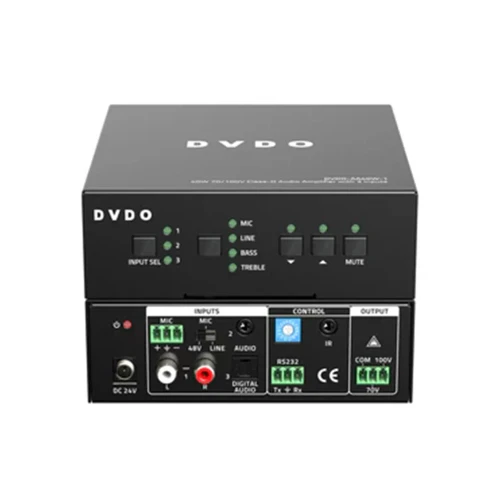






This DVDO AA2x50W-1 2x50W Class-D Audio Amplifier with 3 Inputs & Volume Control is a compact Class D stereo audio amplifier ideal for small to medium-sized AV environments, including classrooms, meeting rooms, small venues, bars, restaurants, and digital signage systems.
It offers three switchable audio inputs: 2 analog (1 x L/R stereo + 1 x 3.5mm) and 1 digital (S/PDIF optical).
The amplifier supports two output configurations: Stereo (2 x 50W @ 8Ω) and Mono (1 x 100W @ 4Ω), with adjustable line, bass, treble, volume and input selection controls.
Operation is flexible, with control options via front panel buttons and knob, IR remote, RS232 or IP with a user-friendly web GUI.
DVDO AA2x50W-1 2x50W Class-D Audio Amplifier with 3 Inputs & Volume Control Features:
- High-efficiency Class D amplification with low heat generation and reliable operation
- Compact design suitable for rack, wall, ceiling or under-table mounting
- Three audio inputs: 2 analog (RCA L/R & 3.5mm) + 1 digital optical audio (S/PDIF)
- Switchable output modes: Stereo 2x50W @ 8Ohm or Mono 1x100W @ 4Ohm
- Loop output for signal pass-through or daisy-chaining
- EQ management including line, bass and treble control
- Volume adjustment via front panel rotary knob
- Control via front panel buttons, IR, RS232 & IP
- Power off memory
Why not buy this DVDO AA2x50W-1 2x50W Class-D Audio Amplifier with 3 Inputs & Volume Control today?
HDTV Supply partners with DVDO to sell and support all DVDO products
Why not buy this DVDO AA2x50W-1 2x50W Class-D Audio Amplifier with 3 Inputs & Volume Control today?
Can this amplifier run in stereo and mono modes, and what are the power ratings for each?
A: Yes. It supports Stereo mode at 2×50W into 8Ω and Mono bridged mode at 1×100W into 4Ω.
What analog and digital inputs does the DVDO AA2x50W-1 provide?
A: It has three selectable inputs: RCA L+R stereo, a 3.5mm stereo jack, and an optical S/PDIF input.
How do I control the amplifier remotely over a network?
A: You can control it over TCP/IP through the built-in web GUI or by sending TCP/IP commands to its IP and port (default IP 192.168.0.178 and port 4001).
Does the amplifier provide a loop output for cascading multiple units and are there any limits?
A: Yes; it has a LOOP audio output for daisy-chaining and the manual states up to 255 units can be looped within the same system, with loop output available only when the first amplifier selects input 1 or 2.
What are the EQ and line volume ranges visible on the front panel?
A: Line volume is reported as a 0–60 scale, while Bass and Treble each use a 0–10 scale per the manual.
If I want to use IP control from a PC without a router, how do I connect?
A: Connect the PC directly to the amplifier’s TCP/IP port with a straight-through Ethernet cable and set the PC’s network segment to match the amplifier’s IP/subnet.