
Build Your Own 1080p HDMI Matrix Switcher
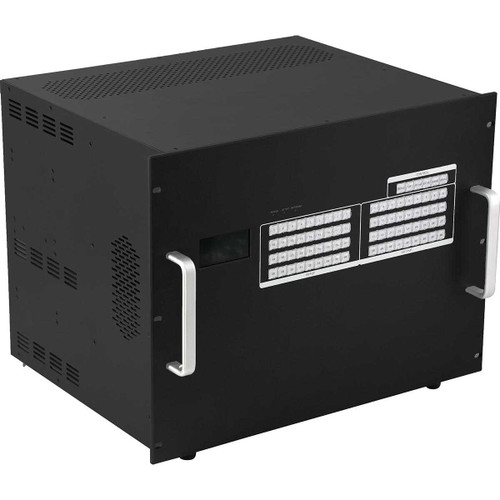
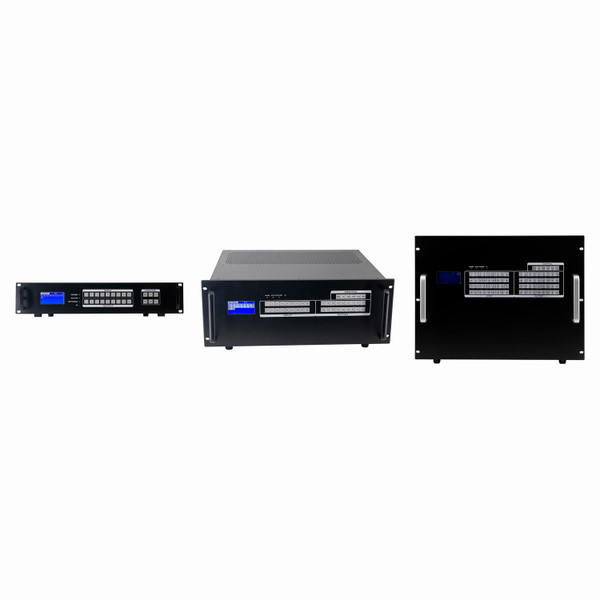
Build a professional 1080p HDMI matrix switching system using single-port modular input and output cards. Choose a 9x9, 18x18 or 36x36 modular chassis and configure the exact number of sources and displays required for your installation.
The single-port card design allows inputs and outputs to be added individually instead of in groups of four. This provides greater configuration flexibility and helps avoid purchasing ports that your project does not need.
Compatible CAT6 output cards and receivers can extend HDMI signals to displays located up to 450 feet away. Compatible cards also provide integrated video wall processing without requiring a separate video wall controller for supported layouts.
Choose from Three Modular Chassis Sizes
Select the card cage that provides the capacity your installation needs today while allowing room for future expansion. Each chassis accepts individual single-port modular cards.
For Small to Medium AV Systems
Supports configurations with up to nine inputs and nine outputs. It is a strong choice for smaller restaurants, conference rooms, schools, houses of worship and other commercial installations.
Recommended SKU:
WP-0909-SP-VW
For Medium to Large AV Systems
Supports configurations with up to eighteen inputs and eighteen outputs. It is ideal for sports bars, larger restaurants, corporate facilities, schools and multi-display commercial environments.
Recommended SKU:
WP-1818-SP-VW
For Large Commercial AV Systems
Supports configurations with up to thirty-six inputs and thirty-six outputs. It is designed for larger sports bars, casinos, command centers, universities, entertainment venues and enterprise AV installations.
Recommended SKU:
WP-3636-SP-VW
Single-Port Modular Card Design
Each modular card provides one individual input or output connection. This allows the system to be configured around the actual number and type of sources and displays required.
For example, an installation requiring seven video sources and thirteen displays can be configured as a 7x13 matrix instead of requiring the customer to purchase inputs and outputs in groups of four.
Key Features
Available Input and Output Card Options
Configure the matrix using compatible single-port input and output cards based on the sources, displays, cable types and distances required for your installation.
Available card types may include:
- HDMI input cards
- HDMI output cards
- CAT6 or twisted-pair input cards
- CAT6 or twisted-pair output cards
- Long-distance CAT6 output cards
- Fiber-optic input and output cards
- SDI input and output cards
- DVI input and output cards
- Compatible audio input or audio extraction options
Integrated Video Wall Processing
Compatible video wall output cards allow one source to be displayed across multiple screens as one larger image. The same matrix can also operate as a traditional video matrix, allowing individual displays to show independently selected sources.
Supported configurations may include:
- 2x2 video walls
- 2x3 video walls
- 3x3 video walls
- Horizontal display layouts
- Vertical display layouts
- Other layouts supported by the selected cards and system configuration
Available video wall layouts and functions depend on the cards, chassis, firmware and final system configuration selected.
HDMI Extension over CAT6
Compatible CAT6 output cards allow HDMI video and supported control signals to be transmitted from the centralized matrix chassis to remote displays. Depending on the selected output card and receiver, supported transmission distances can reach up to 450 feet.
For best performance, use properly terminated solid-copper CAT6 cable that meets the specifications of the selected output card and receiver. Shielded CAT6 cable is recommended for many commercial installations.
Copper-clad aluminum cable should not be used. Cable quality, connectors, patch panels, interference, resolution and installation conditions can affect the maximum operating distance.
Flexible Source-to-Display Routing
Route any connected source to any connected display. One source can be shown on a single display, multiple displays or every display connected to the matrix.
Each display can also show a different source simultaneously. This makes the system well suited for centralized routing of cable receivers, satellite receivers, streaming devices, computers, media players, cameras, digital signage players and other HDMI sources.
Control Options
Depending on the selected configuration, the matrix can be controlled using one or more of the following methods:
- Front-panel buttons
- Web browser graphical user interface
- TCP/IP network commands
- RS232 serial commands
- Infrared remote control
- Windows control software
- iPad or tablet control interface
- Smartphone control interface
- Optional WolfPad control systems
- Compatible third-party commercial AV control systems
Available control methods depend on the chassis, controller, installed cards and optional accessories.
How to Build Your Matrix
Common Applications
- Sports bars and restaurants
- Hotels and hospitality properties
- Casinos and entertainment venues
- Corporate offices and conference centers
- Schools, colleges and universities
- Churches and houses of worship
- Government and military facilities
- Command and control rooms
- Security and surveillance centers
- Healthcare facilities
- Retail and digital signage installations
- Stadiums, arenas and event venues
Frequently Asked Questions
What is a modular HDMI matrix switcher?
A modular HDMI matrix switcher is a professional video routing system that uses interchangeable input and output cards. It can be configured based on the number and type of sources and displays required.
What is the benefit of single-port cards?
Single-port cards allow inputs and outputs to be added individually. This lets you configure the matrix around the actual project requirements instead of purchasing ports in groups.
Which chassis size should I choose?
Choose a chassis large enough for your current number of inputs and outputs, along with any capacity you would like to reserve for future expansion. Available sizes are 9x9, 18x18 and 36x36.
Do I need to fully populate the chassis?
No. You can install only the input and output cards required for the initial system and leave compatible card slots open for future expansion.
Can I expand the matrix later?
Yes. Additional compatible input and output cards can be installed as long as the selected chassis has available capacity.
Can any source be sent to any display?
Yes. Any connected source can be routed to any connected display. The same source can also be routed to multiple displays simultaneously.
Can different displays show different sources?
Yes. Each output can independently display a selected source, subject to the installed cards and final system configuration.
Does the system support video walls?
Yes. Compatible output cards provide integrated video wall processing. Available layouts and functions depend on the selected cards and system configuration.
How far can HDMI be extended over CAT6?
Depending on the selected output card, receiver, cable and signal format, HDMI can be extended up to 450 feet over CAT6.
Can the matrix be controlled over a network?
Network control may be available through a web interface, TCP/IP commands, Windows software, mobile devices or optional WolfPack control solutions.
Can it work with a third-party control system?
Depending on the selected controller, the matrix can be integrated with compatible commercial automation systems using RS232 or TCP/IP commands.
Important Configuration Information
This is a configurable professional AV product. Final specifications, resolution support, switching style, transmission distance, video wall capability, audio support, control methods and required accessories are determined by the chassis and cards selected.
Contact HDTV Supply before ordering when assistance is needed confirming compatibility with video sources, televisions, projectors, LED controllers, control systems or existing cabling.
Need Help Designing Your System?
HDTV Supply can review your number of sources, number of displays, cable distances, resolutions, video wall layouts and control requirements to help identify the correct chassis, cards and receivers.
Call 833-WolfPack (833-965-3722) for configuration assistance.