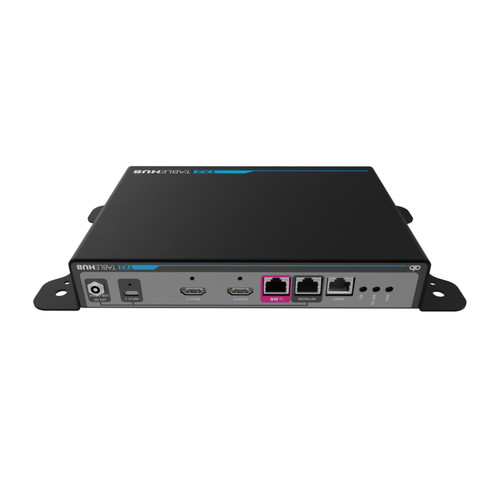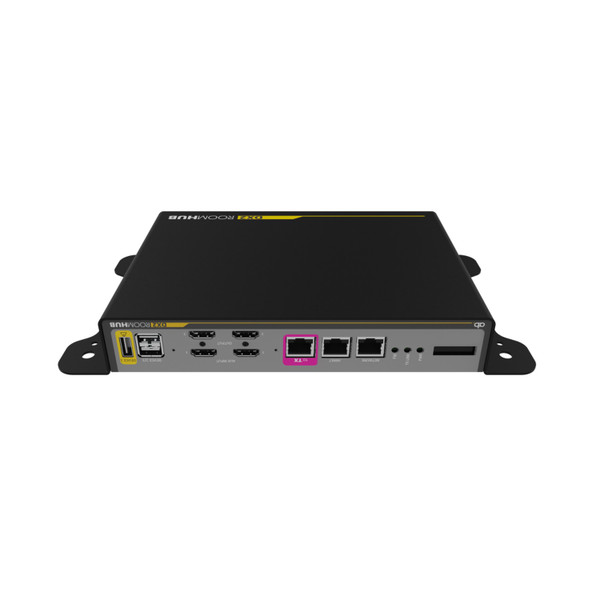

The Ashton Bentley DX2 Room Hub is the room-side unit of the TX2/DX2 meeting room AV kit, routing 4K60 HDMI sources, controlling displays and codecs, and managing the room from one box.
It takes two AUX HDMI inputs plus the signal from the TX2 Table Hub, sends them to two scalable HDMI outputs, and adds USB device ports, RS-232 and CEC display control, and codec control for video conferencing systems.
Setup and monitoring use the built-in web server and OLED display. A 24 V power supply is included, and the DX2 powers the TX2 over the link cable.
Ashton Bentley DX2 Room Hub Features
- Two-box room system with the TX2. The DX2 Room Hub sits near the display or video bar and links to an Ashton Bentley TX2 Table Hub over one Cat6a or Cat7 cable up to 35 m. That replaces a rack of AV gear, but the pair is a closed system and works only with the TX2.
- 4K60 4:4:4 uncompressed video. Both HDMI 2.0 outputs and the signal path from the TX2 carry up to 4K at 60 Hz, 4:4:4, 8-bit, with 16 Gb/s of video data between the boxes. Text and spreadsheets stay sharp on large meeting-room displays, with no compression artifacts.
- Two auxiliary HDMI inputs with sensing. AUX Input 1 and 2 accept a room PC, a NUC, or a guest device, and every input has an integrated equalizer and signal auto-sensing. Output switching can be automatic when a source connects, or manual from the optional Tablebox touch panel.
- Two independently scalable HDMI outputs. Output 1 and Output 2 drive a video bar or dual displays, and each output can be routed to TX2 signals or local signals in the System Configurator. Dual-display rooms get independent routing and scaling without an external scaler.
- Programmable codec control. A 9-pin D-sub serial port and a USB-B port control video conferencing codecs, and the USB-B port is designed for Cisco. When a call starts, the DX2 can wake the displays and route codec video, then switch them off when the codec goes to sleep.
- Two RS-232 display ports with CEC. Two 3.5 mm AB Display Control jacks send programmable RS-232 commands to displays, and CEC control is also available. You can power one or two screens up and down automatically. Check your display's control codes in the System Configurator during setup.
- USB device hub with switched power. Three USB-A device ports connect cameras, speaker bars, or other peripherals. Device 1 supplies non-switched 5 V, while Devices 2 and 3 have 5 V power switched under DX2 control. USB 2.0 passthrough from the TX2 USB-C host is limited to 350 Mbit/s.
- EDID and HDCP management per input. EDID can be chosen from presets or copied from the connected display, and HDCP 1.4 and 2.2 can be selected for each input or disabled. This helps resolve HDCP and resolution handshake problems with video conferencing codecs and laptops.
- Built-in web GUI, OLED, and monitoring. The OLED display shows IP address, subnet, gateway, and firmware versions, and the built-in web server hosts the System Configurator. A 100BaseT port also supports ABSee remote support and monitoring plus a diagnostic terminal, which helps IT teams support many rooms.
Where the DX2 Room Hub Fits
Huddle and meeting rooms: Pair the DX2 with a video bar and a TX2 at the table so guests connect with USB-C or HDMI while the room system stays tidy and under one control point.
Dual-display conference rooms: Two scalable HDMI outputs let you feed two displays from the same source set, with automatic display on and off driven by the codec.
Bring-your-own-device spaces: Guests can present from a laptop while the DX2 handles routing between the TX2 inputs, the AUX HDMI inputs, and the video conferencing system.
Managed corporate and education AV: The web GUI, OLED status display, and ABSee monitoring support let support teams track many rooms from one place.
Why not buy this Ashton Bentley DX2 Room Hub today?
Ashton Bentley DX2 Room Hub Specifications
- Model: 900-00551 (DX2 Room Hub, US power supply)
- Function: Meeting room AV hub: signal routing, video conferencing integration, display control, and monitoring
- Companion unit: Ashton Bentley TX2 Table Hub, linked by one Cat6a/Cat7 cable up to 35 m
- Video resolution: Up to 4K2K at 60 Hz, 4:4:4, 8-bit; HDMI 1.4 and HDMI 2.0 compliant
- Maximum pixel clock: 600 MHz
- HDCP: 1.4 and 2.2, selectable per input or disabled
- Video inputs: 2 x AUX HDMI, plus input from the TX2 over the link port
- Video outputs: 2 x HDMI, each independently scalable
- Audio: HDMI embedded audio
- USB: 1 x USB-A (5 V, non-switched), 2 x USB-A (5 V, switched under DX2 control); USB 2.0 passthrough from the TX2 USB-C host
- Network: 100BaseT Ethernet port for the web GUI, ABSee remote support and monitoring, device port, and diagnostic terminal
- Control ports: 2 x 3.5 mm RS-232 display control, 1 x D-sub 9-pin female codec control, 1 x USB-B codec control, ABNET RJ45 bus for Ashton Bentley peripherals
- Indicators: OLED display showing IP address, gateway, subnet mask, and firmware version; FW, TX Link, and PWR status LEDs
- Power: 24 V DC locking power supply, 65 W, supplied; also powers the TX2 over the link cable
- Operating temperature: 0 to 45 degrees C
- Operating humidity: 10% to 90%, non-condensing
- Warranty: 3 years
- Weight: 4 kg (8.8 lb)
What's in the Box
- 1 x Ashton Bentley DX2 Room Hub (assembly 810-00303)
- 1 x DX2 65W-24V power supply (170-00012)
- 1 x DX2 Quick Start and Safety Guide (770-00064)
Why not buy this Ashton Bentley DX2 Room Hub today?
How to Control the DX2 Room Hub
- Web GUI: The built-in web server hosts the System Configurator for EDID, HDCP, routing, and display and codec settings.
- Tablebox touch panel: The optional Tablebox Touch Panel (900-00509) gives manual input selection at the table and is programmed through the DX2 web GUI.
- RS-232 and CEC: Two display control jacks send programmable commands to displays.
- Codec control: A 9-pin D-sub serial port and a USB-B port control video conferencing codecs.
- ABSee: The 100BaseT port supports ABSee remote support and monitoring.
Ashton Bentley lists a programmable RS-232 port for third-party control systems on the DX2. Confirm command details in the manual.
Why not buy this Ashton Bentley DX2 Room Hub today?
TX2 Table Hub and DX2 Room Hub Interconnectivity Kit Manual (PDF)
TX2/DX2 Product Overview (PDF)
Need help with the manual? Call 833-WOLFPACK (833-965-3722).
Why not buy this Ashton Bentley DX2 Room Hub today?
Does the DX2 Room Hub route and control a whole meeting room?
Yes. The DX2 Room Hub is the room-side half of the Ashton Bentley TX2/DX2 kit. It routes video between the TX2 table inputs, two AUX HDMI inputs, and two HDMI outputs, and it controls displays and conferencing codecs.
Does the DX2 Room Hub support 4K60?
Yes. The DX2 handles up to 4K at 60 Hz with 4:4:4 8-bit uncompressed video on its HDMI 2.0 inputs and outputs, with HDCP 1.4 and 2.2 support that can be disabled when needed.
Can the DX2 work without a TX2 Table Hub?
No. The two AUX HDMI inputs and two HDMI outputs sit on the DX2, but the TX2 link, USB-C input, and laptop charging need a TX2. Ashton Bentley states the TX2 and DX2 are a closed system and do not work with other extenders.
Can the DX2 be 35 m from the TX2?
Yes. The two boxes connect with a single Cat6a or Cat7 cable up to 35 m, which carries video, audio, USB, control, and power from the DX2 to the TX2.
Does the DX2 power the TX2?
Yes. The DX2 supplies power over the link cable to the TX2 using its supplied 24 V 65 W power supply. USB-C laptop charging at the TX2 needs the optional 100 W USB-C charging power supply, part 900-00585.
Can the DX2 control displays and video conferencing codecs?
Yes. It controls displays through two RS-232 jacks and CEC, and it controls codecs through a 9-pin serial port or a USB-B port designed for Cisco. Confirm your exact display or codec in the manual and System Configurator.
Is the DX2 configured through a web browser?
Yes. Connect to the DX2 network port, open the System Configurator in a browser, and set EDID, HDCP, routing, and control options. The OLED display shows the current IP address.
Is part 900-00551 the DX2 Room Hub with US power?
Yes. Part 900-00551 is the DX2 Room Hub with its 65W-24V power supply, listed as US power in our price list. Call us to confirm the plug type if you need a different region.
Does the DX2 Room Hub include a TX2 Table Hub?
No. The DX2 box contains the Room Hub assembly, a 65W-24V power supply, and a Quick Start and Safety Guide. The TX2 Table Hub, USB-C charging power supply, cables, and Tablebox are separate items.
Can HDTV Supply help me choose a TX2/DX2 setup?
Yes. Call 833-WOLFPACK (833-965-3722) and our team can help you match the DX2 with a TX2, cables, a Tablebox touch panel, and your video conferencing equipment.
Why not buy this Ashton Bentley DX2 Room Hub today?
HDTV Supply supplies meeting room AV hubs for conference rooms, huddle spaces, boardrooms, classrooms, and corporate AV installations.
The DX2 Room Hub works with the Ashton Bentley TX2 Table Hub over Cat6a or Cat7, uses HDMI 2.0 video with HDCP 1.4 and 2.2, and connects to video conferencing codecs through serial or USB-B control, with the USB-B port designed for Cisco.
Why not buy this Ashton Bentley DX2 Room Hub today?
This Ashton Bentley DX2 Room Hub includes a 3-year manufacturer warranty. Questions? Call 833-WOLFPACK (833-965-3722).