



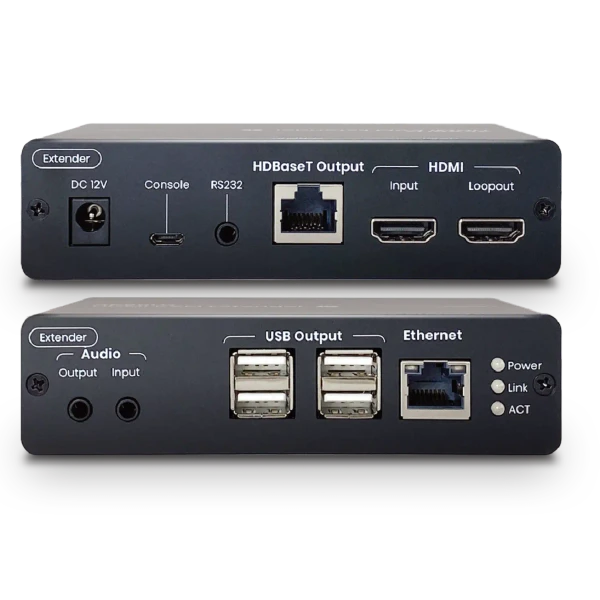


This WolfPack 4K60Hz HDMI KVM Extender with USB 2.0 is a high-performance HDMI KVM extender powered by HDBaseT 3.0 technology, designed for professional environments where ultra-high-definition video, reliable connectivity, and near-zero latency are essential.
Using a single CAT6a or higher cable, it can extend uncompressed 4K video signals up to 100 meters.
Powered by the Valens Stello VS3000 chipset, the extender provides high-speed USB 2.0 connectivity along with bidirectional RS-232, audio, Ethernet, and HDMI loopout capabilities.
It is well suited for industrial control, broadcast facilities, medical imaging, command centers, and large conference rooms.
WolfPack 4K60Hz HDMI KVM Extender with USB 2.0 Features:
- 4K@60Hz 4:4:4 Support: Supports resolutions up to 4096 × 2160 / 3840 × 2160 at 60Hz with 4:4:4 color sampling.
- HDBaseT 3.0 Technology: Transmits uncompressed UHD video with near-zero latency.
- 100m Transmission Distance: Extends 4K@60Hz signals up to 100 meters over a single CAT6a or higher cable.
- USB 2.0 Connectivity: Four USB 2.0 ports on the receiver support keyboards, mice, USB cameras, flash drives, and other peripherals.
- Bidirectional RS-232: Provides reliable two-way serial communication between connected devices.
- Ethernet Extension: Supports Ethernet transmission through the extender.
- HDMI Loopout: Allows the HDMI signal to be passed through to an additional local display.
- CEC Passthrough: Supports CEC signal transmission for compatible HDMI devices.
- Flexible Audio Support: Supports HDMI audio along with 3.5mm audio input/output on the transmitter or receiver.
- HDCP Compliant: Supports HDCP for compatibility with protected digital content.
- Professional KVM Applications: Ideal for industrial control, broadcast centers, medical imaging, large conference rooms, and other mission-critical environments.
Why not buy this WolfPack 4K60Hz HDMI KVM Extender with USB 2.0 from HDTV Supply today?
WolfPack 4K60Hz HDMI KVM Extender with USB 2.0 Specifications:
- Support
- Compliance: HDMI 2.0, HDCP 1.4/2.2, USB 2.0
- Max. Video Resolution: 4K@60Hz 4:4:4
- Max. Transmission Distance: 100m (328.1ft) via HDBaseT3 certified CAT6a U/FTP cable
- RS-232 Baud Rate: 115200 bps / Full duplex
- Ports & Interfaces
- Video Input:
- 1 x HDMI
- 1 x HDBaseT
- Video Output:
- 1 x HDBaseT
- 1 x HDMI
- Audio Input:
- 1 x 3.5mm Phone Jack
- 1 x 3.5mm Phone Jack
- Audio Output:
- 1 x 3.5mm Phone Jack
- 1 x 3.5mm Phone Jack
- USB Connector:
- 1 x USB-Type B
- 4 x USB-Type A
- RS232 Interface:
- 1 x (3.5mm) Phone Jack
- 1 x (3.5mm) Phone Jack
- Console (Firmware Upgrade):
- 1 x USB Micro-B
- 1 x USB Micro-B
- LED Indicators:
- 3-LED Status: Power/Link/ACT
- 3-LED Status: Power/Link/ACT
- Video Input:
- Power
- Power Supply:
- 12V 1.5A
- 12V 1.5A
- Power Consumption:
- 6W
- 10W (keyboard/mouse)
- Power Supply:
- Ambient Temperature
- Operation: 0 to 45°C (32 to 113°F)
- Storage: -40 to 80°C (-40 to 176°F)
- Humidity: Up to 95%
- Max. Operating Altitude: 2000m (6562ft)
- Physical Characteristic
- Dimension:
- 4.92 x 4.84 x 1.26 Inch
- 4.92 x 4.84 x 1.26 Inch
- Weight:
- 0.80 lb
- 0.82 lb
- Dimension:
Why not buy this WolfPack 4K60Hz HDMI KVM Extender with USB 2.0 from HDTV Supply today?
What is the WolfPack 4K60Hz HDMI KVM Extender with USB 2.0?
A: The WolfPack 4K60Hz HDMI KVM Extender is designed to extend high-resolution HDMI video and USB 2.0 KVM signals between a local computer and a remote workstation.
It allows the computer and operator peripherals to be separated over a longer cable path while maintaining remote video, keyboard, mouse, and compatible USB functionality.
What video resolution does it support?
A: The extender supports 4K video at up to 60Hz in compatible configurations, making it suitable for modern UHD computer and AV sources.
The connected source, display, cable, and complete extender link must all support the required resolution and refresh rate for reliable 4K operation.
What does USB 2.0 KVM extension provide?
A: USB 2.0 KVM extension allows a remote keyboard and mouse to communicate with the computer connected to the local extender unit.
Depending on the system configuration, supported USB peripherals can also be extended, providing convenient access to a remotely located computer.
Can HDMI audio be extended?
A: Yes, embedded HDMI audio can travel with the HDMI video signal when supported by the connected equipment.
This allows compatible displays or audio systems at the remote end to receive the source's audio without requiring a separate analog audio extension.
What cable is used for the long-distance connection?
A: The extender is designed to use structured Ethernet-type cabling rather than relying on one long HDMI cable for the entire distance.
The cable category, installation quality, and specified maximum distance should be followed to maintain reliable high-bandwidth operation.
Can it provide remote computer control?
A: Yes, the KVM function provides remote keyboard and mouse access to the connected computer.
This is useful when the computer needs to be installed in a rack, equipment room, secure location, or other area away from the user.
Can it be used for video conferencing?
A: Yes, the extender can be used in compatible conferencing environments where the computer and USB peripherals need to be separated from the display or operator location.
USB device compatibility should be checked for cameras, microphones, speakerphones, and other conferencing peripherals before deployment.
Why use a KVM extender instead of a long HDMI cable?
A: A KVM extender can transport video together with keyboard, mouse, and supported USB signals rather than providing video only.
This makes it possible to create a complete remote workstation and maintain interactive computer access at the destination.
Is it suitable for professional AV installations?
A: Yes, its 4K video and USB KVM capabilities make it appropriate for conferencing, education, control rooms, corporate AV, and professional workstation applications.
Performance depends on the source, display, cable infrastructure, distance, and USB devices used in the installation.
What should be checked before installation?
A: Verify the required HDMI resolution and refresh rate, cable category and distance, USB peripheral requirements, and power requirements.
It is also important to check EDID behavior, source and display compatibility, and the complete signal path before deploying the extender.
