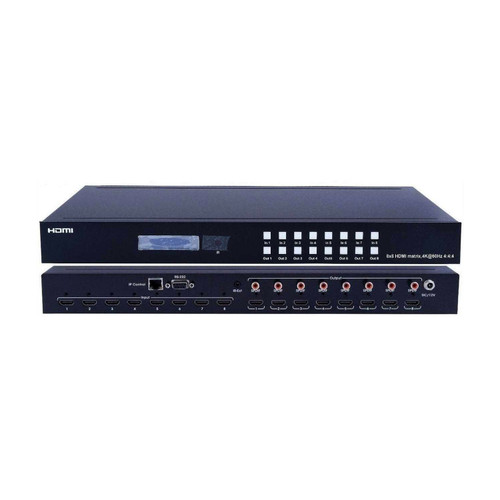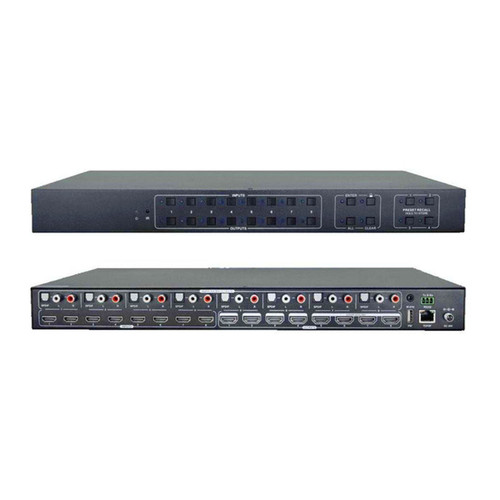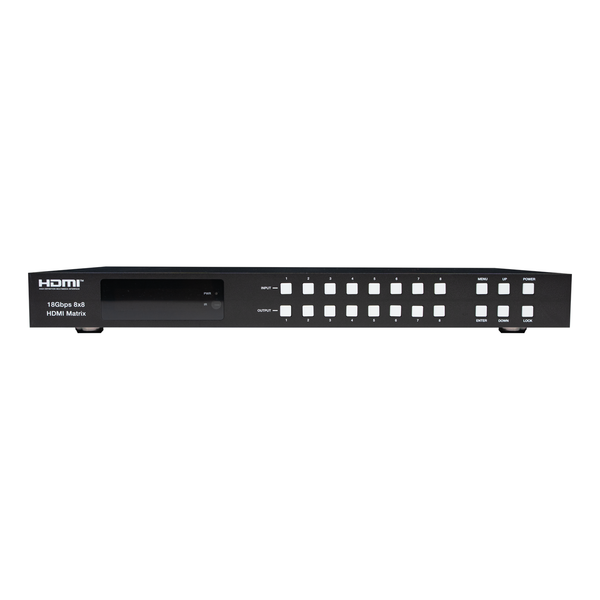


The WolfPack 4K60 8x8 HDMI Matrix Switcher (part number HDTV-WP-8X8-4K60-ARC) routes any of 8 HDMI sources to any of 8 HDMI displays at 4K/60Hz 4:4:4 with full 18Gbps bandwidth. Each output has its own independent 4K → 1080p downscaler, so legacy 1080p displays keep working on the same matrix as your 4K screens. Audio is de-embedded to 8 coaxial and 8 analog L/R outputs, and HDMI ARC returns TV audio back down the same cable to your soundbar or AVR.
What is the WolfPack 8x8 HDMI Matrix (HDTV-WP-8X8-4K60-ARC)? It is an 18Gbps, 1U rack-mounted HDMI 2.0b matrix switcher with 8 inputs and 8 outputs. It supports 4K60 4:4:4, HDCP 2.2, HDR10, HDR10+, Dolby Vision and HLG, per-output scaling, ARC, CEC and smart EDID management. Control it from the front panel, the included IR remote, RS-232, LAN/Telnet or the built-in Web GUI.
Why Buyers Choose This 8x8 Matrix
True 18Gbps, No Compromise
HDMI 2.0b with full 18Gbps bandwidth on every port. 4K60 at 4:4:4 chroma, 12-bit color depth, and HDR10, HDR10+, Dolby Vision and HLG all pass through untouched.
Independent Scaler Per Output
Set any output to Bypass, 4K → 1080p, or Auto. Mix 4K TVs and 1080p displays on the same system without downgrading the whole matrix.
Audio De-Embedded 8 Ways
Every output has a coax RCA and a 3.5mm analog L/R jack. Feed zone amps, distributed audio or a mixing board without an external extractor.
ARC Brings TV Audio Back
Enable ARC per output and the TV's internal apps send audio back through the matrix to the coax output feeding your AVR or soundbar.
CEC Control Built In
Power sources and displays on or off, navigate menus, and control volume and transport over CEC from the Web GUI or RS-232, with no extra IR wiring.
Five Ways to Control It
Front panel buttons with OLED readout, IR remote, RS-232, TCP/IP with Telnet, and a browser-based Web GUI with 8 savable presets.
Key Features
- HDMI 2.0b, HDCP 2.2 and HDCP 1.4 compliant
- Video resolution up to 4K2K@60Hz (YUV 4:4:4) on all HDMI ports
- 18Gbps video bandwidth
- Dolby Vision, HDR10, HDR10+ and HLG supported
- Independent 4K → 1080p down-scaler on each output port
- HDMI audio pass-through up to 7.1CH HD audio (LPCM, Dolby TrueHD, DTS-HD Master Audio, Dolby Atmos, DTS:X)
- Audio de-embedding via 8 analog L/R and 8 coaxial ports
- ARC, CEC and smart EDID management supported
- 1U rack-mounted design with front panel OLED display
- Control via front panel buttons, IR remote, RS-232, LAN and Web GUI
- 8 savable and recallable routing presets
- Metal enclosure with ±8kV air-gap / ±4kV contact ESD protection
What's in the Box
- 1 × 18Gbps 8x8 HDMI Matrix
- 1 × 12V/5A power adapter
- 1 × IR remote control
- 1 × IR receiver cable (1.5 meters)
- 1 × RS-232 serial cable (1.5 meters, male to female)
- 2 × rack mounting ears
- 1 × user manual
Specifications
| Identification | |
| HDTV Supply Part Number | HDTV-WP-8X8-4K60-ARC |
|---|---|
| Product Line | WolfPack Fixed HDMI Matrix Switchers |
| Configuration | 8 HDMI inputs × 8 HDMI outputs, fixed (non-modular) |
| Technical | |
| HDMI Compliance | HDMI 2.0b |
| HDCP Compliance | HDCP 2.2 and HDCP 1.4 |
| Video Bandwidth | 18Gbps |
| Video Resolution | Up to 4K2K@50/60Hz (4:4:4) |
| Color Space | RGB, YCbCr 4:4:4 / 4:2:2 / 4:2:0 |
| Color Depth | 8-bit, 10-bit, 12-bit |
| HDMI Audio Formats (Pass-through) | LPCM 2/5.1/7.1, Dolby Digital, DTS 5.1, Dolby Digital+, Dolby TrueHD, DTS-HD Master Audio, Dolby Atmos, DTS:X |
| Coax Audio Formats | LPCM 2.0, Dolby Digital / Plus, DTS 5.1 |
| L/R Audio Formats | PCM 2.0 |
| HDR Formats | HDR10, HDR10+, Dolby Vision, HLG |
| ESD Protection | Human-body model: ±8kV (air-gap discharge), ±4kV (contact discharge) |
| Connections | |
| Input Ports | 8 × HDMI Type A [19-pin female] 1 × IR EXT [3.5mm stereo mini-jack] |
| Output Ports | 8 × HDMI Type A [19-pin female] 8 × Coax Audio (RCA) 8 × L/R Audio [3.5mm stereo mini-jack] |
| Control Ports | 1 × TCP/IP [RJ45] 1 × RS-232 [D-Sub 9] |
| Mechanical | |
| Housing | Metal enclosure |
| Color | Black |
| Dimensions | 440mm (W) × 200mm (D) × 44.5mm (H) — 1U rack |
| Weight | 2.8 kg |
| Power Supply | Input: AC 100–240V 50/60Hz Output: DC 12V/5A (US/EU standard, CE/FCC/UL certified) |
| Power Consumption | 43W |
| Operating Temperature | -10°C to 45°C / 14°F to 113°F |
| Storage Temperature | -20°C to 60°C / -4°F to 140°F |
| Relative Humidity | 20–90% RH (non-condensing) |
HDMI Cable Distance
| Resolution | 4K60 | 4K30 | 1080p60 |
|---|---|---|---|
| HDMI IN / OUT | 16 ft / 5 M | 32 ft / 10 M | 50 ft / 15 M |
The use of Premium High Speed HDMI cable is highly recommended. For runs beyond these distances, pair the matrix with HDBaseT or fiber extenders.
Front Panel and Rear Panel
Front Panel
| Control | Function |
|---|---|
| OLED screen | Displays matrix switching status, input/output port, EDID, baud rate and IP address. |
| Power LED | Green when connected to power, red when the product is on standby. |
| Input / Output buttons | Press an output button (1–8) first, then press an input button (1–8) to route that source to the output. |
| MENU / ENTER / UP / DOWN | Check and set EDID, set the serial baud rate, and check the current IP address. |
| POWER button | Press and hold 3 seconds to enter standby; short press to wake the device. |
| IR Window | Receives the IR remote signal for this product only. |
| LOCK button | Short press to lock the front panel buttons (except power); press again to unlock. |
Rear Panel
| Connector | Function |
|---|---|
| IR EXT | Insert the IR receiver cable when the matrix is installed in a rack or cabinet out of infrared line of sight. |
| L/R OUT (1–8) | Analog audio output; connect to an amplifier or speaker via 3.5mm audio cable. |
| COAX OUT (1–8) | Coaxial audio output; connect to an AVR or audio processor via coaxial cable. |
| TCP/IP port | Connect to a PC, switch or router with an RJ45 cable for LAN, Telnet and Web GUI control. |
| RS-232 port | Connect to a PC or control system with a D-Sub 9-pin cable for ASCII command control. |
| GND | Connect the housing to ground. |
| INPUT ports (1–8) | HDMI inputs; connect sources such as cable boxes, streamers, Blu-ray players or PCs. |
| OUTPUT ports (1–8) | HDMI outputs; connect TVs, projectors or monitors. |
| DC 12V | Connect to the included 12V/5A power adapter. |
Control Options
IR Remote
Press the output button first, then the input button. Press All then an input to send one source to every display at once. The IR window accepts signal up to 7 meters at ±45°. If the matrix is racked, plug the included IR receiver cable into the IR EXT port and place the eye where you can see it.
Web GUI
The default IP address is 192.168.1.100. You can read the current IP from the front panel by pressing MENU and then UP/DOWN, or by sending r ipconfig! over RS-232. Connect the TCP/IP port to your network, put your PC on the same subnet, and browse to the matrix IP.
| Setting | Default |
|---|---|
| IP address | 192.168.1.100 |
| Subnet mask | 255.255.255.0 |
| TCP/IP port | 8000 |
| Telnet port | 23 |
| Admin login | Username Admin / Password admin |
| User login | Username User / Password user |
The Web GUI has seven pages: Status (model, firmware, network), Video (routing plus 8 presets you can name, set, save and clear), Input (input naming and EDID upload/download), Output (output naming, scaler mode, ARC and stream on/off), CEC (source and display control), Network (static or DHCP, gateway, subnet, Telnet port, password changes) and System (panel lock, beep, LCD timeout, baud rate, firmware update, factory reset and reboot).
RS-232 Serial
Connect the RS-232 port to a PC or control processor using the included serial cable, then send ASCII commands from any terminal tool.
| Serial Parameter | Value |
|---|---|
| Baud rate | 115200 (also 57600, 38400, 19200, 9600, 4800) |
| Data bits | 8 |
| Stop bits | 1 |
| Parity / check bit | 0 (none) |
| Delimiter | ! terminates every command |
RS-232 / Telnet Command Reference
Every command ends with an exclamation point. In the table below, x is parameter 1 and y is parameter 2.
| Command | Function | Example |
|---|---|---|
| Power | ||
s power z! |
Power the device on or off (z=0 off, z=1 on) | s power 1! |
r power! |
Get current power state | r power! |
s reboot! |
Reboot the device | s reboot! |
| System Setup | ||
help! |
List all commands | help! |
r type! |
Get device model | r type! |
r status! |
Get all unit status: power, beep, lock, in/out connection, crosspoint, EDID, scaler, network | r status! |
r fw version! |
Get firmware version (MCU BOOT, MCU APP, Web GUI) | r fw version! |
r link in x! |
Get connection status of input port x (x=0–8, 0=all) | r link in 1! |
r link out y! |
Get connection status of output port y (y=0–8, 0=all) | r link out 1! |
s reset! |
Reset to factory defaults | s reset! |
s beep z! |
Enable/disable buzzer (z=0 off, z=1 on) | s beep 1! |
s lock z! |
Lock/unlock front panel buttons (z=0 off, z=1 on) | s lock 1! |
s lcd on time z! |
LCD on-time (0=off, 1=always on, 2=15s, 3=30s, 4=60s) | s lcd on time 1! |
s save preset z! |
Save the current routing to preset z (z=1–8) | s save preset 1! |
s recall preset z! |
Recall saved preset z (z=1–8) | s recall preset 1! |
s clear preset z! |
Clear stored preset z (z=1–8) | s clear preset 1! |
r preset z! |
Get preset z information (z=1–8) | r preset 1! |
s logo1 ...! |
Set line 1 of the LCD logo, max 16 characters | s logo1 WOLFPACK! |
s logo2 ...! |
Set line 2 of the LCD logo, max 16 characters | s logo2 HDP-MXB88DA! |
s baud rate xxx! |
Set serial baud rate (115200, 57600, 38400, 19200, 9600, 4800) | s baud rate 115200! |
s id z! |
Set the control ID of the product (z=000–999) | s id 888! |
| Routing | ||
s in x av out y! |
Route input x to output y (x=1–8, y=0–8, 0=all) | s in 1 av out 2! |
r av out y! |
Get output y signal status (y=0–8, 0=all) | r av out 0! |
| Output / Scaler | ||
s hdmi y stream z! |
Turn output y stream on/off (y=0–8, z=0 disable, z=1 enable) | s hdmi 1 stream 1! |
r hdmi y stream! |
Get output y stream status | r hdmi 1 stream! |
s hdmi y scaler z! |
Set output y scaler mode (1=bypass, 2=4K→1080p, 3=auto) | s hdmi 1 scaler 1! |
r hdmi y scaler! |
Get output y scaler mode | r hdmi 1 scaler! |
| EDID | ||
s edid in x from z! |
Set input x EDID to defined mode z (x=0–8, z=1–31) | s edid in 1 from 1! |
r edid in x! |
Get EDID status of input x | r edid in 0! |
r edid data hdmi y! |
Get the raw EDID data of output port y (y=1–8) | r edid data hdmi 1! |
| Audio / ARC | ||
s hdmi y arc z! |
Turn ARC on/off for output y (y=0–8, z=0 off, z=1 on) | s hdmi 1 arc 1! |
r hdmi y arc! |
Get the ARC state of output y | r hdmi 1 arc! |
| CEC — Input Sources | ||
s cec in x on! / off! |
Power input x on or off by CEC (x=0–8, 0=all) | s cec in 1 on! |
s cec in x menu! / back! |
Open menu or back operation on input x | s cec in 1 menu! |
s cec in x up! down! left! right! enter! |
Menu navigation on input x | s cec in 1 up! |
s cec in x play! pause! stop! rew! ff! |
Transport control on input x | s cec in 1 play! |
s cec in x previous! / next! |
Previous or next track on input x | s cec in 1 next! |
s cec in x mute! vol-! vol+! |
Volume control on input x | s cec in 1 vol+! |
| CEC — Displays | ||
s cec hdmi out y on! / off! |
Power display on output y on or off (y=0–8, 0=all) | s cec hdmi out 1 on! |
s cec hdmi out y mute! vol-! vol+! |
Volume control on the display at output y | s cec hdmi out 1 vol+! |
s cec hdmi out y active! |
Set output y as active source | s cec hdmi out 1 active! |
| Network | ||
r ipconfig! |
Get the full current IP configuration | r ipconfig! |
r mac addr! |
Get the network MAC address | r mac addr! |
s ip mode z! |
Set IP mode (z=0 static, z=1 DHCP) | s ip mode 0! |
r ip mode! |
Get the network IP mode | r ip mode! |
s ip addr xxx.xxx.xxx.xxx! |
Set the static IP address (turn DHCP off first) | s ip addr 192.168.1.100! |
r ip addr! |
Get the network IP address | r ip addr! |
s subnet xxx.xxx.xxx.xxx! |
Set the subnet mask | s subnet 255.255.255.0! |
s gateway xxx.xxx.xxx.xxx! |
Set the network gateway | s gateway 192.168.1.1! |
s tcp/ip port x! |
Set the TCP/IP port (x=1–65535) | s tcp/ip port 8000! |
s telnet port x! |
Set the Telnet port (x=1–65535) | s telnet port 23! |
s net reboot! |
Reboot the network module to apply new settings | s net reboot! |
After changing any IP setting, send s net reboot! or repower the device for the new configuration to take effect. DHCP must be off before a static address, subnet or gateway can be written.
EDID Management
The matrix has 21 factory-defined EDID settings, 2 user-defined EDID slots and 8 copy-from-output modes. Set EDID from the front panel buttons, with s edid in x from z! over RS-232, or from the Input page of the Web GUI. User EDID files upload and download as .bin from the Web GUI.
| Mode | EDID Description | Mode | EDID Description |
|---|---|---|---|
| 1 | 1080p, Stereo Audio 2.0 | 17 | 4K2K60_444, Dolby/DTS 5.1 |
| 2 | 1080p, Dolby/DTS 5.1 | 18 | 4K2K60_444, HD Audio 7.1 |
| 3 | 1080p, HD Audio 7.1 | 19 | 4K2K60_444, Stereo Audio 2.0 HDR |
| 4 | 1080i, Stereo Audio 2.0 | 20 | 4K2K60_444, Dolby/DTS 5.1 HDR |
| 5 | 1080i, Dolby/DTS 5.1 | 21 | 4K2K60_444, HD Audio 7.1 HDR |
| 6 | 1080i, HD Audio 7.1 | 22 | USER1 |
| 7 | 3D, Stereo Audio 2.0 | 23 | USER2 |
| 8 | 3D, Dolby/DTS 5.1 | 24 | Copy from HDMI output 1 |
| 9 | 3D, HD Audio 7.1 | 25 | Copy from HDMI output 2 |
| 10 | 4K2K30_444, Stereo Audio 2.0 | 26 | Copy from HDMI output 3 |
| 11 | 4K2K30_444, Dolby/DTS 5.1 | 27 | Copy from HDMI output 4 |
| 12 | 4K2K30_444, HD Audio 7.1 | 28 | Copy from HDMI output 5 |
| 13 | 4K2K60_420, Stereo Audio 2.0 | 29 | Copy from HDMI output 6 |
| 14 | 4K2K60_420, Dolby/DTS 5.1 | 30 | Copy from HDMI output 7 |
| 15 | 4K2K60_420, HD Audio 7.1 | 31 | Copy from HDMI output 8 |
| 16 | 4K2K60_444, Stereo Audio 2.0 |
Where This Matrix Gets Installed
Sports Bars and Restaurants
Eight cable boxes or streaming players feeding eight TVs, with routing presets for game day, happy hour and close. Coax outputs feed the zone amp.
Home Theater and Whole-House AV
One rack of sources shared across the theater, living room, bedrooms and patio. ARC returns smart TV audio to the AVR.
Conference Rooms and Boardrooms
Laptops, room PCs and video codecs routed to displays and projectors, controlled by a Crestron, Control4 or Q-SYS processor over RS-232 or IP.
Houses of Worship and Auditoriums
Cameras, presentation PCs and playback devices routed to confidence monitors, lobby displays and stream encoders.
Retail and Digital Signage
Media players routed to storefront and in-aisle screens, with per-output scaling so older 1080p panels stay in service.
Command Centers and Control Rooms
Any source to any monitor with instant preset recall and third-party control over Telnet on port 23.
Which WolfPack 8x8 Matrix Is Right For You?
HDTV Supply builds several 8-input matrix switchers. They differ in resolution ceiling, output count and how audio is handled. Use this to pick the right one before you order.
| Model | Max Resolution | Outputs | Audio De-Embed | Best For |
|---|---|---|---|---|
| HDTV-WP-8X8-4K60-ARC (this product) |
4K60 4:4:4, 18Gbps | 8 | Coax + analog L/R on all 8 | Sports bars, home theater and conference rooms running current 4K sources where you also need separate audio feeds and ARC. |
| WolfPack 4K30 8x8 | 4K30 | 8 | Varies by model | Budget installs where sources top out at 4K30 or 1080p and the extra bandwidth would go unused. |
| WolfPack 8K60 8x8 HDMI 2.1 | 8K60 4:2:0 / 8K30 4:4:4 | 8 | Optical + balanced analog | Future-proofing for 8K sources, or installs that need seamless switching with no screen blanking. |
| WolfPack Fixed 8x9 | Varies by model | 9 | Varies by model | When you need one more display than an 8x8 provides, such as a ninth screen for a lobby or back office. |
| WolfPack Fixed 16x16 | Varies by model | 16 | Varies by model | Larger venues running more than 9 displays, or installs expected to grow past 8 TVs. |
Not sure which fits? Call HDTV Supply at 833-WOLFPACK (833-965-3722) and we will size the system for your room count and source list.
Related Products and Resources
- All WolfPack Fixed 8x8 HDMI Matrix Switchers — compare every 8x8 we carry
- WolfPack Fixed HDMI Matrix Switchers — the full fixed-matrix line from 4x2 to 16x16
- Third-Party Drivers for WolfPack Matrix Systems — Control4, Elan, RTI and more
- Free Web GUI Control — how the browser interface works across WolfPack matrices
- WolfPack Premium High Speed HDMI Cables — required for reliable 4K60 at 16 ft and beyond
- WolfPack HDBaseT HDMI over CAT6 Extenders — push outputs well past the 16 ft HDMI limit
- WolfPad Tablet TV Control Systems — iPad control for bar staff
- Sports Bar TV Distribution Systems — complete packaged installs
- Extended Warranties & Repairs
Frequently Asked Questions
What is the part number for this 8x8 HDMI matrix?
The HDTV Supply part number is HDTV-WP-8X8-4K60-ARC. Use this number when ordering, requesting a quote, or opening a support ticket so we can pull the correct firmware and documentation for your unit.
Does this 8x8 HDMI matrix support 4K 60Hz 4:4:4?
Yes. On the HDTV Supply WolfPack HDTV-WP-8X8-4K60-ARC, all eight inputs and all eight outputs support 4K2K@60Hz at full 4:4:4 chroma with 18Gbps bandwidth, HDMI 2.0b and HDCP 2.2. No chroma subsampling is required.
Can I mix 4K and 1080p displays on the same matrix?
Yes. This is one of the main reasons integrators choose this WolfPack matrix. Each output has its own independent scaler that can be set to Bypass, 4K → 1080p, or Auto. Set the outputs feeding 1080p displays to downscale while your 4K outputs stay in bypass at native resolution.
Does it support HDR and Dolby Vision?
Yes. The WolfPack HDTV-WP-8X8-4K60-ARC passes HDR10, HDR10+, Dolby Vision and HLG through untouched when the output is set to bypass mode and the source, cable and display all support the format.
How do I get audio out to an amplifier or soundbar?
Every one of the eight outputs on this WolfPack matrix has a coaxial RCA audio output and a 3.5mm analog L/R output. Coax carries LPCM 2.0, Dolby Digital / Digital Plus and DTS 5.1. The analog L/R jacks carry PCM 2.0. No external audio extractor is needed.
What does the ARC feature do on this matrix?
ARC returns audio from a smart TV's built-in apps back down the HDMI cable to the matrix, where it is output on that output's coax port to your AVR or soundbar. Turn ARC on per output in the Web GUI or with s hdmi y arc 1! over RS-232.
What is the default IP address and login?
On the HDTV Supply WolfPack HDTV-WP-8X8-4K60-ARC, the default IP address is 192.168.1.100 with subnet 255.255.255.0, TCP/IP port 8000 and Telnet port 23. The admin login is username Admin and password admin. A limited User login is available with username User and password user. You can read the current IP from the front panel OLED or by sending r ipconfig! over RS-232.
What are the RS-232 serial settings?
115200 baud, 8 data bits, 1 stop bit, no parity. Every ASCII command ends with an exclamation point. The baud rate can be changed to 57600, 38400, 19200, 9600 or 4800 from the front panel, the Web GUI System page, or with s baud rate 9600!.
Can I save routing presets?
Yes. The matrix stores 8 named presets. Save the current routing with s save preset 1! and recall it later with s recall preset 1!, or manage presets from the Video page of the Web GUI.
Will this work with Control4, Crestron, Savant or Home Assistant?
Yes. The WolfPack HDTV-WP-8X8-4K60-ARC accepts standard ASCII commands over RS-232 at 115200 baud, over TCP/IP on port 8000, and over Telnet on port 23. HDTV Supply also publishes third-party drivers for Control4, Elan and RTI. Any control system, automation platform or custom script that can send ASCII strings can drive it.
How far will HDMI run from this matrix?
Using Premium High Speed HDMI cable, expect 16 ft / 5 M at 4K60, 32 ft / 10 M at 4K30, and 50 ft / 15 M at 1080p60 on both the input and output side. For longer runs, add HDBaseT or fiber HDMI extenders on the affected outputs.
What is the rack size and power draw?
The WolfPack HDTV-WP-8X8-4K60-ARC is a 1U rack-mount chassis measuring 440mm wide by 200mm deep by 44.5mm high, weighing 2.8 kg. Two mounting ears are included. It draws 43W from the supplied 12V/5A external power adapter.
What if my display shows no picture or the wrong resolution?
This is almost always EDID, and it is the single most common support call HDTV Supply gets on any matrix switcher. Set the affected input to a defined EDID that matches your lowest common display, such as mode 1 for 1080p Stereo 2.0 or mode 16 for 4K2K60_444 Stereo 2.0, using s edid in 1 from 16! or the Input page of the Web GUI. You can also copy the EDID directly from a connected display with modes 24 through 31.
Specifications, default network settings and the RS-232 command set on this page were verified by HDTV Supply against the manufacturer documentation on August 6, 2026. Firmware updates may add commands; contact support at 833-WOLFPACK (833-965-3722) if your unit behaves differently.