



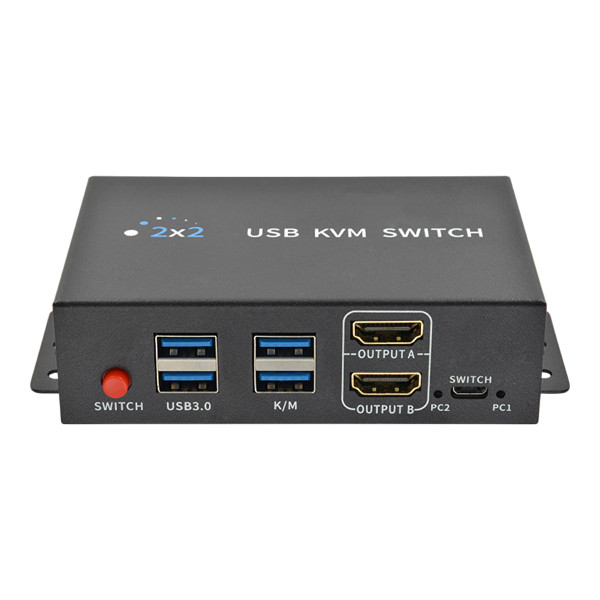

This WolfPack 4K 60 Hz 2-Port Dual Monitor HDMI KVM Switch lets you control 2 computers from 1 keyboard, 1 mouse and 2 monitors. Each computer connects with 2 HDMI cables and 1 USB 3.0 cable. Press one button and both monitors, the keyboard, the mouse and your USB devices move to the other computer. It supports 4K at 60 Hz on both HDMI outputs and uses HDMI 2.0 at 18 Gbps.
The KVM switch has 4 HDMI inputs and 2 HDMI outputs. Computer 1 uses inputs A1 and B1. Computer 2 uses inputs A2 and B2. Output A and Output B go to your 2 monitors. Extended mode and duplicate mode are both supported, and the display mode is set on the connected computer.
You get three ways to switch between the computers. Use the button on the front panel, the wired desktop controller that sits on your desk, or hotkeys typed on your keyboard. The keyboard and mouse switch with zero delay, and no driver is needed.
The front panel has 2 USB 3.0 ports at 5 Gbps for devices like a printer, USB flash drive, portable SSD or webcam, plus 2 ports for your keyboard and mouse. The USB devices follow the computer you select, so one set of devices is shared by both computers.
The KVM switch is plug and play and hot swappable, so you can connect and disconnect devices at any time without powering off. It works with Windows, macOS, Linux and Unix. The metal housing has mounting ears for installing it under a desk or in a rack shelf.
WolfPack 4K 60 Hz 2-Port Dual Monitor HDMI KVM Switch Features:
- 2 Computers, 2 Monitors: 1 keyboard, 1 mouse and 2 monitors control 2 computers.
- 4K 60 Hz Video: Supports up to 4K (3840x2160) at 60 Hz on both HDMI outputs.
- HDMI 2.0: 18 Gbps maximum bandwidth.
- 4 HDMI Inputs: 2 HDMI inputs for each computer.
- 2 HDMI Outputs: Output A and Output B for dual monitors.
- Extended & Duplicate Modes: The display mode is set on the connected computer.
- USB 3.0: 5 Gbps data transfer and backward compatible with USB 2.0.
- Shared USB Devices: Printers, USB flash drives, portable SSDs, external hard drives, scanners and webcams switch with the selected computer.
- Front Panel Button: One-press switching between PC 1 and PC 2.
- Desktop Controller: Wired remote button for switching from your desk.
- Hotkey Switching: Switch computers from your keyboard.
- Zero Delay Switching: Keyboard and mouse switch instantly.
- Plug and Play: No driver required.
- Hot Swappable: Connect and disconnect at any time with no need to power off devices.
- Cross-System Compatible: Windows, macOS, Linux and Unix.
- Metal Housing: With mounting ears.
What's in the Box:
- 1 - 2-Port Dual Monitor HDMI KVM Switch
- 1 - Desktop controller
- 1 - Desktop controller cable
- 2 - USB 3.0 cables
- 1 - USB power cable
- 1 - User manual
Why not buy this WolfPack 4K 60 Hz 2-Port Dual Monitor HDMI KVM Switch from HDTV Supply today?
WolfPack 4K 60 Hz 2-Port Dual Monitor HDMI KVM Switch Specifications:
- Product Type: 2x2 HDMI KVM Switch (2 computers, 2 monitors)
- HDMI Inputs: 4 (2 per computer: A1 and B1 for PC 1, A2 and B2 for PC 2)
- HDMI Outputs: 2 (Output A and Output B)
- Max Resolution: 4K (3840x2160) @ 60Hz
- HDMI Standard: HDMI 2.0
- Maximum Bandwidth: 18Gbps
- USB Version: USB 3.0 (compatible with USB 2.0/3.0)
- USB Data Transfer Rate: 5Gbps
- USB Inputs: 2 (1 x USB 3.0 IN per computer)
- Front Panel USB Ports: 2 x USB 3.0 device ports and 2 x keyboard/mouse ports
- Supported USB Devices: Scanners, USB flash drives, external HDDs, portable SSDs, printers, webcams
- Switching Modes: Front panel button, desktop controller, hotkey
- Switching Delay: Zero delay keyboard and mouse switching
- Hot-Swap: Supported
- Driver: Plug and play, no driver required
- Compatible OS: Windows, macOS, Linux, Unix
- Power: USB 5V 2A, DC 5V power input
- Material: Metal
- Package Size: 16 x 15 x 9 cm
- Package Weight: 0.425 kg
Why not buy this WolfPack 4K 60 Hz 2-Port Dual Monitor HDMI KVM Switch from HDTV Supply today?
Ways to Control the WolfPack 4K 60 Hz 2-Port Dual Monitor HDMI KVM Switch:
There are three ways to switch between PC 1 and PC 2.
- Front Panel Button: Press the SWITCH button on the front of the unit for one-touch switching.
- Desktop Controller: Plug the wired desktop controller into the SWITCH port and press its button from your desk. The PC 1 and PC 2 lights on the front show which computer is selected.
- Hotkeys: Switch directly from your keyboard using the keys below.
Hotkey Commands
- Ctrl + Ctrl + 1 or 2: Switch to PC 1 or PC 2
- * + * + 1 or 2: Switch to PC 1 or PC 2
- Ctrl + Ctrl + A: Enable the hotkey function (enabled by default)
- Ctrl + Ctrl + B: Disable the hotkey function
After disabling the hotkey function, enable it again before using hotkey switching.
Why not buy this WolfPack 4K 60 Hz 2-Port Dual Monitor HDMI KVM Switch from HDTV Supply today?
WolfPack 4K 60 Hz 2-Port Dual Monitor HDMI KVM Switch FAQs:
What does this KVM switch do?
It lets 1 keyboard, 1 mouse and 2 monitors control 2 computers. You switch both monitors and all connected USB devices from one computer to the other with one press.
What resolution does it support?
It supports up to 4K (3840x2160) at 60 Hz on both HDMI outputs, using HDMI 2.0 at 18 Gbps.
How do I connect my two computers?
Each computer connects with 2 HDMI cables and 1 USB 3.0 cable. PC 1 goes to HDMI inputs A1 and B1 and the Input 1 USB 3.0 port. PC 2 goes to HDMI inputs A2 and B2 and the Input 2 USB 3.0 port. Connect your 2 monitors to Output A and Output B, then plug your keyboard and mouse into the K/M ports.
Does each computer need two HDMI outputs?
Yes, for dual monitors. Each computer sends 2 HDMI signals to the KVM switch, one for each monitor.
Can I use extended and duplicate display modes?
Yes. Both extended mode and duplicate mode are supported. The display mode is set on the connected computer.
How do I switch between computers?
There are three ways: the SWITCH button on the front panel, the wired desktop controller, and keyboard hotkeys. For hotkeys, press Ctrl + Ctrl + 1 or 2, or * + * + 1 or 2.
Can both computers share USB devices like a printer or flash drive?
Yes. The front USB 3.0 ports work with printers, USB flash drives, portable SSDs, external hard drives, scanners and webcams. The devices switch to whichever computer is selected.
Do I need to install a driver?
No. It is plug and play and no driver is required. It is also hot swappable, so you do not need to power off your devices to connect or disconnect them.
Which operating systems does it work with?
It works with Windows, macOS, Linux and Unix.
What cables should I use?
Use high-quality HDMI 2.0 cables and USB 3.0 cables for optimal performance. The box includes 2 USB 3.0 cables, the desktop controller cable and a USB power cable.
How is it powered?
It uses USB 5V 2A power through the DC 5V port with the included USB power cable.


