



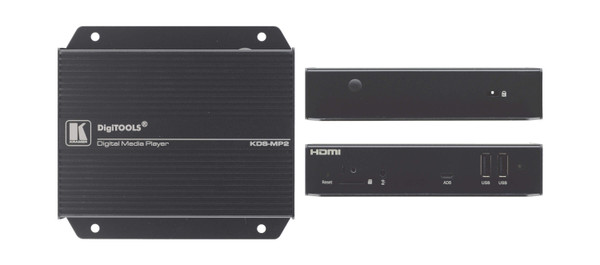

The Kramer KDS-MP2 plays scheduled digital signage content on an HDMI display. LAN-based content management lets an installer update signs without replacing a computer at each screen.
KDS-MP2 Detailed Features
- Run scheduled signage without a display-side PC. The media player supplies HDMI video and audio to a connected screen. It is intended for repeatable signage playback such as reception information, menus, notices, and promotional content.
- Present Full HD content. Support includes 1080p and WUXGA resolutions. Prepare media at a supported format so text and graphics fit the intended display layout.
- Store content inside the player. The unit includes 8GB of internal memory. This provides onboard space for signage assets, with actual capacity depending on file sizes and the selected media mix.
- Manage content over the local network. LAN-based management and integrated SMIL control support content updates without physically replacing a computer at each screen. Plan network access for the staff responsible for signage maintenance.
- Build layouts with Media Manager. The software supports ready-made layouts, logos, tickers, and widgets. These tools help organize different types of information within the signage presentation.
- Use supported audio and video codecs. The listed formats include H.264/MPEG-4, MPEG-1, MPEG-2, VC-1, and MP3. Check both the codec and the required playback format when preparing content.
- Keep scheduled playback aligned. An NTP client supports time synchronization. Correct time settings matter when different messages must appear at specific times of day.
- Mount close to the display. The compact unit includes mounting provisions and a VESA-compatible bracket arrangement. Keep its ventilated side panel clear when installing behind a screen or inside a cabinet.
Specifications
| Manufacturer part number | 60-00002390 |
|---|---|
| I/O CONNECTORS | 1 HDMI, 2 USB 2.0, 1 Ethernet on a RJ–45 connector, 1 unbalanced stereo audio on a 3.5mm mini jack, micro SD card slot. |
| VIDEO FORMAT SUPPORT | POPAI Screen Media Standards |
| VIDEO FORMAT SUPPORT | S6 (MPEG–1 SIF, 3Mbps CBR) |
| VIDEO FORMAT SUPPORT | S7 (MPEG–1 480p, 10Mbps CBR) |
| VIDEO FORMAT SUPPORT | S8 (MPEG–1 720p, 15Mbps CBR) |
| VIDEO FORMAT SUPPORT | S9 (MPEG–2 480p, 6Mbps CBR) |
| VIDEO FORMAT SUPPORT | S10 (MPEG–2 720p, 12Mbps CBR) |
| VIDEO FORMAT SUPPORT | S11 (MPEG–4 AVC, 480p, 6Mbps CBR) |
| VIDEO FORMAT SUPPORT | S12 (MPEG–4 AVC, 720p, 10Mbps CBR) |
| VIDEO FORMAT SUPPORT | E4 (VC–1/WMV9, MP@ML, 720p) |
| VIDEO FORMAT SUPPORT | E7 (MPEG–4 ASP, 480p, 10Mbps CBR) |
| VIDEO FORMAT SUPPORT | E8 (MPEG–4 AVC, 1080p, 10Mbps CBR). |
| IMAGE FORMAT SUPPORT | POPAI Screen Media Standards |
| IMAGE FORMAT SUPPORT | S1 (JPEG 480p baseline) |
| IMAGE FORMAT SUPPORT | S2 (JPEG 720p baseline) |
| IMAGE FORMAT SUPPORT | S3 (JPEG 1080p baseline) |
| IMAGE FORMAT SUPPORT | E1 (PNG 24bpp+alpha, 480p) |
| IMAGE FORMAT SUPPORT | E2 (PNG 24bpp+alpha, 720p) |
| IMAGE FORMAT SUPPORT | E3 (PNG 24bpp+alpha, 1080p). |
| AUDIO CODEC SUPPORT | POPAI Screen Media Standards |
| AUDIO CODEC SUPPORT | S4 (MPEG L2 audio) |
| AUDIO CODEC SUPPORT | S5 (MP3 audio, 320Kbps). |
| DYNAMIC CONTENT | W3C HTML5 (HTML, CSS, JavaScript) |
| DYNAMIC CONTENT | W3C SMIL 3.0 instructions (sub–set). |
| INDICATORS | Power(green), Status(orange). |
| LOCAL STORAGE | 8 GB on–board flash memory (up to 6hrs of typical 720p video @3Mbps) |
| LOCAL STORAGE | Micro SD card expansion slot. |
| POWER REQUIREMENT | 12V 1.5A DC. |
| POWER CONSUMPTION | 6W. |
| OPERATING TEMPERATURE | 0° to 45°C (32° to 113°F). |
| STORAGE TEMPERATURE | –40° to +70°C (–40° to 158°F) . |
| HUMIDITY | 10 — 85% @40°C, 32° to 104°F non–condensing. |
| SAFETY | UL/FCC/CE/CCC/C–Tick/VCCI certified power supplies. |
| INCLUDED ACCESSORIES | AC adapter, HDMI cable, 4 Velcro (2 sets). |
| Product Dimensions — PRODUCT DIMENSION | 13.90cm x 12.90cm x 3.10cm (5.47" x 5.08" x 1.22" ) W, D, H |
| Product Weight | 0.4kg (0.8lbs) approx. |
| Shipping Dimensions — SHIPPING DIMENSION | 35.10cm x 21.20cm x 7.20cm (13.82" x 8.35" x 2.83" ) W, D, H |
| Shipping Weight | 0.9kg (2.1lbs) approx. |
Technical Questions and Answers
What does the KDS-MP2 do?
The Kramer KDS-MP2 plays scheduled digital signage content on an HDMI display. LAN-based content management lets an installer update signs without replacing a computer at each screen.
What is specified for i/o connectors?
1 HDMI, 2 USB 2.0, 1 Ethernet on a RJ–45 connector, 1 unbalanced stereo audio on a 3.5mm mini jack, micro SD card slot.
What is specified for video format support?
POPAI Screen Media Standards
What is specified for image format support?
POPAI Screen Media Standards
What is specified for audio codec support?
POPAI Screen Media Standards
What is specified for dynamic content?
W3C HTML5 (HTML, CSS, JavaScript)
What is specified for indicators?
Power(green), Status(orange).
What are the power requirement requirements?
12V 1.5A DC.
Choosing the Right Product
What is the Kramer KDS-MP2 used for?
It is used for digital signage and scheduled information displays. Plays scheduled digital signage content on an HDMI display. LAN-based content management lets an installer update signs without replacing a computer at each screen.
Who should choose the KDS-MP2?
Choose this model when your project needs digital signage and scheduled information displays. Compare the model-specific connections and specifications above with the equipment in your system.
What should I check before ordering the KDS-MP2?
Confirm manufacturer part 60-00002390, the required connections and the installation requirements. Use the linked documentation to check compatible equipment and required accessories.


