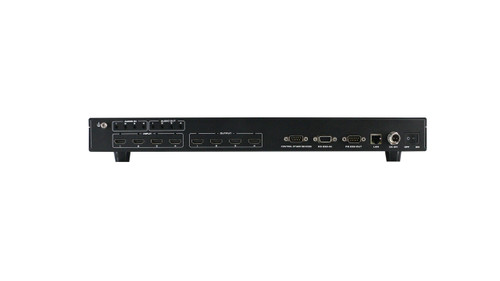
Eight 4K Sources, Eight Displays, Three Ways to Show Them
The HDTV-MVM-8x8-4K60V2 connects up to eight HDMI sources and eight HDMI displays. Route any source to any display, combine several sources onto one screen with the built-in multiviewer, or spread one source across a video wall. Output scaling and independent EDID management let displays of different resolutions share the same system. Control it from an iOS and Android app, the front panel, an IR remote, the web interface, or RS-232.
Any of eight HDMI sources routes to any of eight HDMI outputs, with control by app, web interface, RS-232, IR, or the front-panel buttons.
Three Display Modes From One Chassis
Matrix switching, multiview, and video wall processing run from the same chassis. [[FILL: state which modes can run at the same time and on which outputs]]
Key Specifications at a Glance
| HDMI Connections | 8 HDMI 2.0 inputs and 8 HDMI 2.0 outputs |
| Maximum Video Format | 4K at 60Hz, 4:4:4, 8-bit |
| Bandwidth | 18Gbps |
| Display Functions | Seamless matrix switching, multiviewer, video wall processing, and output scaling |
| HDCP | HDCP 2.2 and HDCP 1.4 |
| Chassis | 1U |
4K60 Video and Seamless Switching
HDMI 2.0 connectivity supports resolutions up to 4K at 60Hz with 4:4:4 color sampling at 8-bit depth. The matrix provides seamless switching, so sources change without the black screen and resync delay of a standard matrix. HDCP 2.2 and HDCP 1.4 sources are both supported.
Output Scaling, EDID, and Audio Integration
Output resolution adjustment and independent EDID management help accommodate connected equipment, so a 1080p display and a 4K display can run from the same system. Analog audio embedding and de-embedding connect the matrix to external audio equipment such as a distributed audio amplifier or a house sound system.
Built for Sports Bars, Boardrooms, and Control Rooms
[[FILL: two or three sentences on the real installs this unit goes into. Name the use case: a bar showing eight games with a four-up multiview on the main screen, an operations center running a 2x2 wall, a conference room feeding two projectors.]]
Front-Panel Status Screen
A built-in TFT status screen on the front panel shows current routing at the rack, so an installer can confirm assignments without opening a laptop or the app.
Technical Specifications
| Part Number | HDTV-MVM-8x8-4K60V2 |
| HDMI Connections | 8 HDMI 2.0 inputs and 8 HDMI 2.0 outputs |
| Maximum Video Format | 4K at 60Hz, 4:4:4, 8-bit |
| Bandwidth | 18Gbps |
| Display Functions | Seamless matrix switching, multiviewer, video wall processing, and output scaling |
| Multiview Layouts | [[FILL: exact layouts, e.g. 2x2, PIP, PBP, 3-window]] |
| Video Wall Sizes | [[FILL: exact arrangements supported]] |
| Output Scaling Resolutions | [[FILL: list of selectable output resolutions]] |
| HDCP | HDCP 2.2 and HDCP 1.4 |
| HDR Support | [[FILL: HDR10 supported, or state "not supported at 8-bit 4:4:4"]] |
| Audio | Analog audio embedding and de-embedding |
| Audio Connectors | [[FILL: connector type and count]] |
| EDID | Independent EDID management |
| Control Options | iOS and Android app, front-panel buttons, IR remote, web interface over TCP/IP, and RS-232 |
| Front-Panel Display | Built-in TFT status screen |
| Chassis | 1U |
| Dimensions | [[FILL: W x D x H]] |
| Weight | [[FILL]] |
| Power Supply | [[FILL: internal or external, input voltage]] |
| Power Consumption | [[FILL: watts]] |
| Operating Temperature | [[FILL]] |
| Maximum HDMI Cable Length | [[FILL: at 4K60 and at 1080p]] |
| In the Box | [[FILL: matrix, power supply, IR remote, rack ears, manual]] |
| Warranty | [[FILL: your standard term]] |
Control Methods
- iOS and Android app: the supplied user manual describes app control using MCS Connect.
- Web interface: browser control over TCP/IP from any device on the same network.
- RS-232: integration with a third-party control system.
- IR remote: included handheld control.
- Front-panel buttons: direct routing at the rack with the TFT status screen.
Downloads
User Manual (PDF)
Product Brochure (PDF)
RS-232 Command Set / HEX Codes
Free iOS App
Free Android App
Third-Party Control Drivers
What is the HDTV-MVM-8x8-4K60V2?
It is an 8x8 4K60 HDMI matrix switcher that combines seamless switching, multiviewer functionality, video wall processing, and output scaling in a 1U chassis.
How many HDMI sources and displays can I connect?
The matrix provides eight HDMI inputs for source devices and eight HDMI outputs for displays.
Does this matrix support 4K at 60Hz?
Yes. It supports video up to 4K60 with 4:4:4 color sampling at 8-bit depth and 18Gbps bandwidth. HDCP 2.2 and HDCP 1.4 are both supported.
What is the difference between multiview and a video wall?
Multiview combines several sources into a layout on one screen. Video wall processing spreads one image across multiple screens arranged as a single canvas.
What multiview layouts and video wall sizes are supported?
[[FILL: the actual answer]]
Can I run multiview and a video wall at the same time?
[[FILL: yes or no, and which outputs are involved]]
Can I control it with an iOS and Android app?
Yes. The supplied user manual describes iOS and Android app control using MCS Connect. Front-panel buttons, an IR remote, the web interface over TCP/IP, and RS-232 are also supported.
Does it support external audio equipment?
Yes. Analog audio embedding and de-embedding support integration with external audio equipment.
Does it include scaling and EDID management?
Yes. Output resolution adjustment and independent EDID management help accommodate connected sources and displays.
How far can I run HDMI cable from the matrix?
[[FILL: distance at 4K60 and 1080p, then link to your HDBaseT extenders]]
Need a different size or longer cable runs?
Other 8x8 HDMI matrix switchers | All matrix switchers with video wall and multiview | HDBaseT extenders for runs past the HDMI limit | Premium HDMI cables
Call 833-WolfPack (833-965-3722) to confirm the right configuration for your install.