


HDTV Supply’s WolfPack 4K 30 Hz 16x16 HDMI Switcher routes any of 16 HDMI sources to up to 16 displays.
This matrix supports 4K at 30 Hz, HDMI 1.4 and HDCP 1.4. For HDCP 2.3/2.2 source devices, ask HDTV Supply about the optional converters.
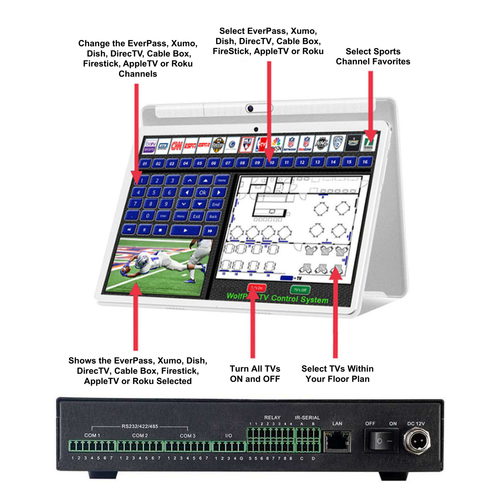
Optional tablet control is available through the WolfPad Sports Bar Tablet Control System .
WolfPack 16x16 HDMI Matrix Features
- 16 HDMI inputs and 16 HDMI outputs
- Maximum resolution: 4K at 30 Hz
- HDMI 1.4 and HDCP 1.4 compliant
- 1U rack-mount chassis
- Front-panel input and output buttons
- Two-line front-panel status display
- IR remote, RS-232 and Ethernet control
- Web GUI and MCS mobile app control
- Rename sources, displays and saved scenes
- 16 saved presets / configuration scenes
- Per-input EDID selection with built-in formats and OUT1 through OUT16 choices
- Route one source to multiple displays
- Each display can select an HDMI source
- HDMI audio support includes LPCM 7.1CH, Dolby TrueHD, Dolby Digital and DTS-HD Master Audio
- 3.5 mm audio output follows HDMI output 1
- Wired network connection; no built-in Wi-Fi
- Fanless operation
- Includes a 12 V DC, 5 A power adapter
- One-year warranty
Suitable for sports bars, restaurants, conference rooms, schools, houses of worship, home theaters and other installations requiring HDMI matrix routing.
HDTVFIX1600E Specifications
- Model: WolfPack HDTVFIX1600E
- Inputs: 16 HDMI inputs
- Outputs: 16 HDMI outputs
- Maximum resolution: 4K at 30 Hz
- HDMI: HDMI 1.4
- HDCP: HDCP 1.4
- Saved presets: 16
- EDID: Built-in format choices and OUT1 through OUT16 options, selectable per input
- Audio output: 3.5 mm output follows HDMI output 1
- Control: Front panel, IR remote, RS-232 and Ethernet
- Network: Wired LAN; no built-in Wi-Fi
- Default IP: 192.168.1.80
- Default login: admin / admin
- RS-232: 9600 baud, 8 data bits, no parity, 1 stop bit
- Network ports: TCP 5000 / UDP 4000
- Mounting: 1U rack mount
- Power adapter: TDX-1205000
- Adapter output: 12 V DC, 5 A, 60 W
- Adapter input: 100–240 V AC, 50/60 Hz, 2 A
- Dimensions: 480 × 252 × 44 mm
- Weight: 3.5 kg
- Operating temperature: 0–40°C
- Storage temperature: -20–60°C
- Warranty: One year
The adapter’s 60 W rating describes its output capacity, not the matrix’s measured power consumption.
Package Contents
- 1 HDMI matrix switcher
- 1 12 V DC, 5 A power adapter
- 1 IR remote control
- 2 rack ears
Support Resources
The current online setup guide is linked at the bottom of this product description.
Help Documents and iOS & Android Apps
UDP Control Commands for Fixed Matrix Switchers
Additional 16x16 & 16x32 IR Remote Reference
Follow the current HDTVFIX1600E manual for the supplied remote. Other reference documents may show a different remote.
HDTVFIX800E IR Code Reference — Confirm Compatibility Before Use
HDTVFIX800E RS-232 Reference — Confirm Compatibility Before Use
WolfPack Product Information

Reasons To Buy an HDTV Supply WolfPack Product
HDTVFIX1600E warranty: One year. See the current manual for complete terms.
Control Options
Control the matrix using its front panel, IR remote, RS-232 interface or wired network connection.
Help Documents and iOS & Android Apps
Optional Tablet Control
Third-Party Control Integration
The matrix can be integrated with third-party control systems using RS-232 and appropriate programming.
Experienced AV professionals may develop drivers for systems such as:
- AMX
- Control4
- Crestron
- RTI
- DTVGameControl
- Elan g!
- Media Switcher
- OnControls
- Savant
- SimpleControl
- SwitchItUp
- SAVI Control
- URC Control
Contact HDTV Supply for applicable command documentation and available drivers.
Listing a control system does not establish certification or a tested integration. Third-party programming, installation and support should be handled by your qualified integrator.
HDTVFIX1600E Questions & Answers
Q: How do I reset the IP address and login?
A: Send the serial command Reset. to restore IP address 192.168.1.80 and login credentials admin/admin. This is different from recalling a preset.
Q: How many presets can I save?
A: The matrix supports 16 saved presets.
Q: Which remote buttons select presets?
A: Use the upper INPUT number buttons for both SAVE and RECALL, then press ENTER.
Q: How do I select channel 10?
A: Press 4K, then 0 in the appropriate INPUT or OUTPUT group. For channels 11–16, press 4K followed by 1–6.
Q: How do I configure EDID?
A: Open the web GUI’s EDID tab and select a setting for the relevant input. Choices include built-in formats and OUT1 through OUT16 options.
Q: Does the matrix have Wi-Fi?
A: No. Connect it to your local network with an Ethernet cable. A mobile device can use Wi-Fi on the same local network.
Q: Which output does the audio jack follow?
A: The 3.5 mm audio output follows HDMI output 1.
Q: Does Recall use brackets?
A: No. Send Recall10. to recall preset 10, including the final period.
Q: What is the warranty?
A: One year. See the current manual for the complete terms.
Need Help Choosing a Matrix?
Tell us how many sources and displays you need, your required resolution and your preferred control method.
Call 833-WOLFPACK / 833-965-3722 or email customerservice@hdtvsupply.com .

Videos Hide Videos Show Videos
-

WolfPack 4K 30 Hz 16x16 HDMI Matrix Switch with Apps & WEB GUI
Easily Control 16 HDMI Sources to 16 Displays – High-Performan...
-
How to Save and Recall a Scene using the Front Panel on the 16x16 HDMI Matrix Switch
How to Save and Recall a Scene using the Front Panel on the 16...
-
Saving and Recalling a Scene using the Web GUI
Saving and Recalling a Scene using the Web GUI on the 16x16 HD...
-
4K2K HDMI 16x16 Matrix switch
-
Changing IP address on WolfPack 16x16
Changing IP address on WolfPack 16x16, 8x8 and 4x4
-
How to upgrade the FIX 16x16 HDMI matrix switcher
WEB GUI control, Wolfpack, matrix switcher
-
Direct connect our 10" tablet to a Matrix Switch
Connecting our 10" tablet to a Modular Matrix Switch or Fixed ...
-
IR remote control for the FM modular Matrix Switcher