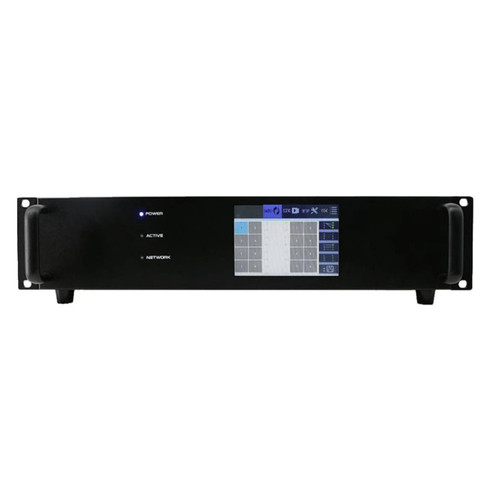




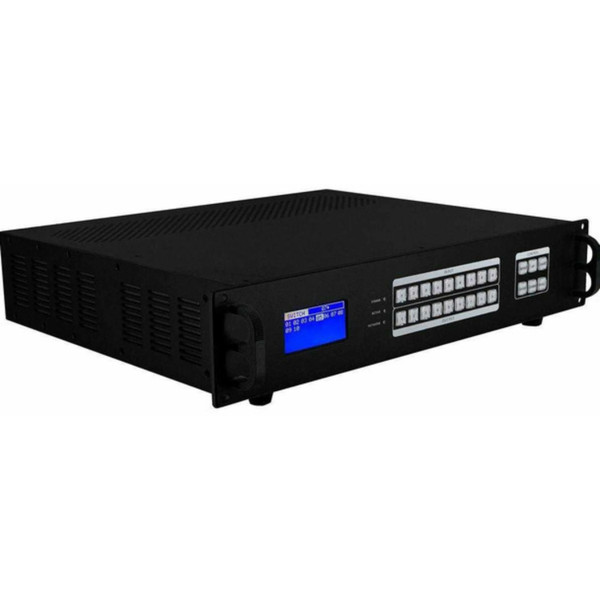


The WolfPack 4K 60 4:4:4 DisplayPort Matrix Switch with DisplayPort In & DisplayPort Out routes two DisplayPort sources to two DisplayPort destinations. Select which source each output receives, or send one source to both outputs. This configured modular system includes two single-port input cards and two single-port output cards for a compact, clearly defined 2x2 signal-routing setup.
DisplayPort is commonly used on PC graphics cards, workstation GPUs, docking stations, conference-room laptops, and professional displays. A DisplayPort-to-DisplayPort matrix lets you choose between compatible sources without repeatedly moving cables. Set your sources to a resolution and refresh rate supported by both the cards and the destination displays.
The supplied DP1.3 cards support resolution up to 4K at 60Hz with 4:4:4 color and provide a 3.5mm audio-embedding function. Plan short cable runs: the card documentation specifies less than 8m/20ft. For MST-aware workflows, verify the complete signal path before ordering; MST hub functionality or transport through this matrix is not specified.
WolfPack 2x2 DisplayPort Matrix Switch Features
- Two inputs and two outputs. Connect two DisplayPort source devices and two compatible destination devices. Route either source to either output, or select the same source for both outputs, to suit presentation and workstation signal-distribution needs.
- 4K60 with 4:4:4 color. The supplied input and output card specifications support resolutions up to 4K at 60Hz with 4:4:4 color. Use compatible sources, displays, and cables; a display with a lower supported resolution still limits your usable signal format.
- DP1.3 input and output cards. Your configured system includes two WP-DP-IN-4K60 input cards and two WP-DP-OUT-4K60 output cards. Each card provides one DisplayPort signal connection, making the supplied port count easy to identify and plan around.
- 3.5mm audio embedding. Both card specifications list a 3.5mm audio-embedding function. This provides an option for adding an external audio signal to your DisplayPort path. Confirm connector behavior and your source-audio requirements with WolfPack before configuring a separate audio workflow.
- Customized resolution inputs. The supplied documentation lists support for customized resolution inputs on both card types. Check your required timing with WolfPack before installation, especially when a computer or professional display uses a format other than a common video resolution.
- Short DisplayPort cable runs. Keep cable distances below the documented 8m/20ft limit. The two stated units are not equivalent, so use the more conservative limit of less than 20ft for planning and verify the required cable at your chosen resolution.
- Flexible control choices. Use the WolfPack modular platform's front-panel controls, Web GUI, RS-232, and iOS or Android apps for source selection.
- 9x9 chassis, 2x2 today. You receive a WolfPack 9x9 modular chassis populated as a 2x2 DisplayPort matrix—two inputs and two outputs installed and ready to route. Seven input slots and seven output slots remain open, so you can grow the system later with matching WolfPack DisplayPort cards without replacing the chassis. Call 833-WOLFPACK to plan the cards and timing for your next stage.
Where the 2x2 DisplayPort Matrix Fits
Conference rooms: Select between a compatible room PC and a docking-station source for presentation destinations. Confirm that the dock provides the required DisplayPort output format.
Workstations and training spaces: Route computer video to the destination needed for a demonstration or lesson while keeping source and destination connections organized.
Professional display installations: Use a DisplayPort-native path where the installed displays and graphics hardware favor that connector. Check the required resolution, audio behavior, and cable lengths during system design.
Why not buy this WolfPack 4K60 4:4:4 2x2 DisplayPort Matrix Switch today?
WolfPack 2x2 DisplayPort Matrix Switch Specifications
- Model / manufacturer part number: WP-2x2DP-4K60
- Configured matrix: 2 DisplayPort inputs and 2 DisplayPort outputs
- Input card: WP-DP-IN-4K60; WolfPack 1-port 4K60 DisplayPort input; quantity 2
- Output card: WP-DP-OUT-4K60; WolfPack 1-port 4K60 DisplayPort output; quantity 2
- Card interface: DisplayPort, DP1.3 input and output support
- Maximum documented resolution: 4K at 60Hz, 4:4:4
- Audio: 3.5mm audio-embedding function listed for both card types
- Resolution handling: Customized resolution inputs supported as listed in the card documentation
- Documented cable distance: Less than 8m/20ft; use less than 20ft as the conservative planning limit
- Control: Front panel, Web GUI, RS-232, iOS/Android apps
- Chassis: WolfPack 9x9 modular matrix chassis; supplied as 2x2 (2 inputs / 2 outputs installed); up to 7 additional inputs and 7 additional outputs with matching cards
What's in the Box
- 1 x WolfPack 9x9 modular matrix chassis, configured as a 2x2 DisplayPort matrix
- 2 x WP-DP-IN-4K60 single-port input cards, installed
- 2 x WP-DP-OUT-4K60 single-port output cards, installed
Why not buy this WolfPack 4K60 4:4:4 2x2 DisplayPort Matrix Switch today?
How to Control Your DisplayPort Matrix
- Front panel: Select routes locally at the chassis.
- Web GUI: Use the WolfPack modular platform's browser-based control interface on your network.
- RS-232: Integrate source selection into a compatible control system using the applicable command set.
- iOS and Android apps: Use the platform's mobile-control options after network setup.
Ask for the control documentation matching your supplied chassis before programming. Availability of a driver does not imply certification of the complete installation or guarantee compatibility with every controller version.
Why not buy this WolfPack 4K60 4:4:4 2x2 DisplayPort Matrix Switch today?
Manuals and Installation Help
The WP-2x2DP-4K60 configuration guide will be posted when available. Need the matching chassis manual, control commands, or card documentation now? Call 833-WOLFPACK (833-965-3722).
Before installation, confirm your source timing, display capabilities, audio plan, and cable lengths. The supplied card images identify the input and output models; they show the cards, not a complete assembled chassis.
Why not buy this WolfPack 4K60 4:4:4 2x2 DisplayPort Matrix Switch today?
WolfPack 2x2 DisplayPort Matrix Switch Q&A
Can this matrix route two DisplayPort sources to two outputs?
Yes. The WP-2x2DP-4K60 is configured with two single-port input cards and two single-port output cards. Select a source for each output or route the same source to both outputs.
Do the supplied cards support 4K at 60Hz with 4:4:4 color?
Yes. Both supplied card specifications list resolution up to 4K60Hz 4:4:4. Your source, destination, cable, and selected timing must also support the required format.
Do both card types support DP1.3?
Yes. The WP-DP-IN-4K60 input card and WP-DP-OUT-4K60 output card both list DP1.3 support.
Can I embed audio through a 3.5mm connection?
Yes. The documentation for both card types lists a 3.5mm audio-embedding function. Confirm the intended connector behavior and audio routing for your configuration before installation.
Do the cards support customized resolution inputs?
Yes. Customized resolution inputs are listed in both supplied card specifications. Ask WolfPack to verify any specific nonstandard timing before you order.
Can I plan a DisplayPort cable run of 20ft or longer?
No. The card documentation specifies less than 8m/20ft. Because those units are not equivalent, plan conservatively for less than 20ft and verify your cable at the required format.
Is MST hub functionality specified for this matrix?
No. The supplied card specifications do not establish MST hub functionality or MST transport through the matrix. Verify any MST-dependent workflow with WolfPack before purchasing.
Are both input and output cards included in this configuration?
Yes. The configured chassis includes two WP-DP-IN-4K60 input cards and two WP-DP-OUT-4K60 output cards. This is a complete 2x2 routing configuration rather than a single replacement card.
Can I discuss expansion before buying?
Yes. The WP-2x2DP-4K60 ships in a 9x9 chassis with two inputs and two outputs installed, so seven input and seven output slots remain available for later cards. Call 833-WOLFPACK (833-965-3722) to confirm compatible cards and expansion timing.
Does this WolfPack matrix include a two-year warranty?
Yes. This WolfPack matrix includes a two-year WolfPack warranty. Call 833-WOLFPACK (833-965-3722) for warranty terms and assistance choosing the right configuration.
Why not buy this WolfPack 4K60 4:4:4 2x2 DisplayPort Matrix Switch today?
DisplayPort Compatibility and Applications
HDTV Supply supplies matrix-routing systems for conference rooms, training spaces, schools, workstations, and professional AV installations. This configuration is intended for compatible DisplayPort source and destination devices using the supplied DP1.3 cards.
A PC graphics card, dock, or laptop must provide a compatible DisplayPort signal, and the destination must accept the selected resolution and refresh rate. Dock capabilities vary; a connector alone does not guarantee 4K60 4:4:4 operation. Verify cable length and signal requirements across the complete route.
Why not buy this WolfPack 4K60 4:4:4 2x2 DisplayPort Matrix Switch today?
Two-Year WolfPack Warranty
This WolfPack 4K60 2x2 DisplayPort Matrix Switch includes a two-year WolfPack warranty. Questions about coverage or service? Call 833-WOLFPACK (833-965-3722).