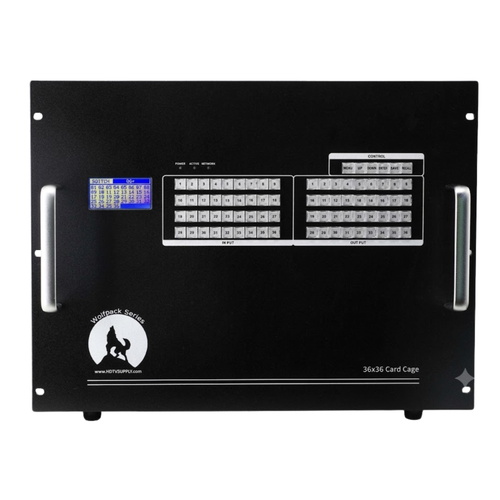




WolfPack 4K60 36×36 Modular HDMI Matrix Switcher (Build-to-Order)
Build a scalable 36×36 matrix that routes any input to any output (including one source to all displays) in a modular chassis. Choose the exact mix of HDMI and optional HDBaseT (CAT6) input/output cards to match your installation today — and expand later.
Best For
- Sports bars, casinos, houses of worship, campuses, corporate AV, control rooms, and digital signage
- Installations needing centralized switching with optional long-run distribution over CAT6 (HDBaseT up to 230 ft / 70 m)
- Projects that may expand sources or displays over time
Key Benefits
- Modular reliability: slide-in card architecture makes upgrades and field service faster — no need to replace the entire chassis.
- 4K@60Hz platform: designed for modern UHD workflows, signage, and live switching.
- Flexible I/O: mix HDMI and HDBaseT/CAT6 input and output cards within the same chassis.
- Multiple control methods: iOS/Android app, Web GUI, fast front-panel switching, RS-232, and LAN (TCP/IP) control.
- EDID management: advanced EDID handling helps reduce black screens and handshake issues across mixed-resolution displays.
- Redundant uptime: dual hot-swappable power supplies and dual control ports (RS-232 + LAN) for mission-critical environments.
Quick Spec Summary (Installer-Friendly)
| Chassis | WolfPack modular 36×36 backplane (build-to-order) |
|---|---|
| Video | Up to 4K@60Hz (4:2:0) switching platform |
| Inputs / Outputs | Up to 36 inputs × 36 outputs (card mix depends on your design) |
| Signal Types | HDMI cards · HDBaseT (CAT6) cards |
| HDBaseT Range | Up to 230 ft / 70 m over single CAT5e/6 cable (with HDBaseT cards) |
| Audio | HDMI embedded audio pass-through (PCM 2-ch/5.1/7.1, Dolby Digital, DTS) |
| HDCP | HDCP 2.2 compliant (backward compatible with HDCP 1.4 sources/displays) |
| HDMI Version | HDMI 2.0 |
| Control | Front-panel buttons, Web GUI, iOS/Android app, RS-232, LAN (TCP/IP), IR |
| EDID | Advanced EDID management (copy, built-in presets, custom upload) |
| Power | Dual redundant hot-swappable power supplies (100–240V AC, 50/60Hz) |
| Rack Size | 8U rack-mountable chassis |
If you're mixing 4K and 1080p displays, plan your EDID and scaling strategy up front. EDID/HDCP mismatches are the #1 cause of black screens in large matrix systems. See our EDID troubleshooting guide →
How to Build Your 36×36 System
- Count your sources — cable/satellite boxes, Apple TV, Blu-ray, PCs, media players, signage players.
- Count your displays — TVs, projectors, monitors, video walls, AVRs.
- Choose your signal path:
- HDMI cards — when displays are within ~15 ft of the rack/headend.
- HDBaseT (CAT6) cards — when displays are remote (up to 230 ft / 70 m over structured cabling).
- Plan audio requirements — if AVRs or soundbars need multichannel audio, specify this when ordering.
- Leave expansion headroom — ordering extra empty slots now saves time and money later.
Recommended Startup Order (Reduces Handshake Problems)
- Power on displays / AVRs first
- Power on the WolfPack chassis
- Power on sources last
This sequence lets the matrix detect display EDID data before sources begin their HDCP handshake.
Common Issues & Fast Fixes
Black screen on one or more outputs
Set EDID to a safe profile (typically 1080p) on the affected output. Power-cycle the source connected to that input to force a fresh HDCP handshake. If you're mixing 4K and 1080p displays on the same source, a 1080p EDID preset on the matrix often resolves the issue.
HDCP error / content blocked
One device in the chain may not support the HDCP level required for 4K protected content (HDCP 2.2). Verify every link in the chain — source → matrix → cable/extender → display — supports the same HDCP version. Downgrading output resolution to 1080p (HDCP 1.4) can confirm whether HDCP 2.2 is the issue.
Audio missing or wrong format
Check the EDID audio profile on the matrix for that output. If it's set to 2-channel stereo and an AVR expects multichannel (Dolby/DTS), the source may only send stereo. Switch the EDID to a profile that advertises multichannel audio support.
Intermittent signal drops over HDBaseT
Verify CAT6 cable runs are under 230 ft (70 m) and terminated to T568B standard. Avoid running CAT6 parallel to high-voltage power lines. Use shielded cable (STP) in electrically noisy environments. Re-terminate or replace suspect cable ends.
IR Control via Phoenix Connector
Each LHDT output card includes a Phoenix (green terminal block) connector for wired IR control of up to 4 zones per card. Each IR port provides IR-Transmit (IR-T), IR-Receive (IR-R), and 5V power pins — enabling remote IR pass-through to control source devices from display locations.
Frequently Asked Questions
Can I send one source to all 36 TVs?
Yes. WolfPack matrices support one-to-many routing — send any single input to all 36 outputs simultaneously, or create any custom combination of input-to-output routes.
Do I have to use CAT6?
No. CAT6 is only required when you select HDBaseT output cards for long-distance runs (up to 230 ft / 70 m). For displays located near the rack or headend, standard HDMI output cards are typically used.
Will it work with Apple TV, cable boxes, Roku, and Fire TV?
Yes — provided your full signal chain (source → matrix card → cable/extender → display) supports the required resolution and HDCP level for the content being played. Most consumer devices work out of the box at 1080p; 4K sources require HDCP 2.2 end-to-end.
Can I control the matrix from a third-party control system?
Yes. The WolfPack 36×36 supports RS-232 serial and LAN (TCP/IP) command control, making it compatible with Crestron, Control4, Savant, RTI, Bitfocus Companion, and other automation platforms. See our control command guide for the full protocol.
Does it support IR control?
Yes. The LHDT output cards include Phoenix connectors for wired IR pass-through — up to 4 IR zones per card (IR-Transmit, IR-Receive, and 5V per zone). This allows you to control source devices remotely from each display location.
What's the maximum HDMI cable length from the matrix?
Standard HDMI cables reliably carry 4K@60Hz up to about 15 feet (5 m). For longer runs, use HDBaseT output cards (up to 230 ft / 70 m over CAT6) or active optical HDMI cables.
What information should I send for the fastest quote?
- Number of sources + source device models
- Number of displays + display models
- Longest HDMI or CAT6 cable run lengths
- Desired resolution (4K@60Hz, 4K@30Hz, or 1080p)
- Any AVRs or audio requirements (stereo vs. multichannel surround)
- Third-party control system in use (Crestron, Control4, etc.), if any
Need Help Designing the Right Card Mix?
Tell us your source count, display count, and cable run lengths. We'll recommend the right configuration and expansion plan for your WolfPack 36×36 build.
Request a Free QuoteOr call us: 833-WOLFPACK (833-965-3722)