



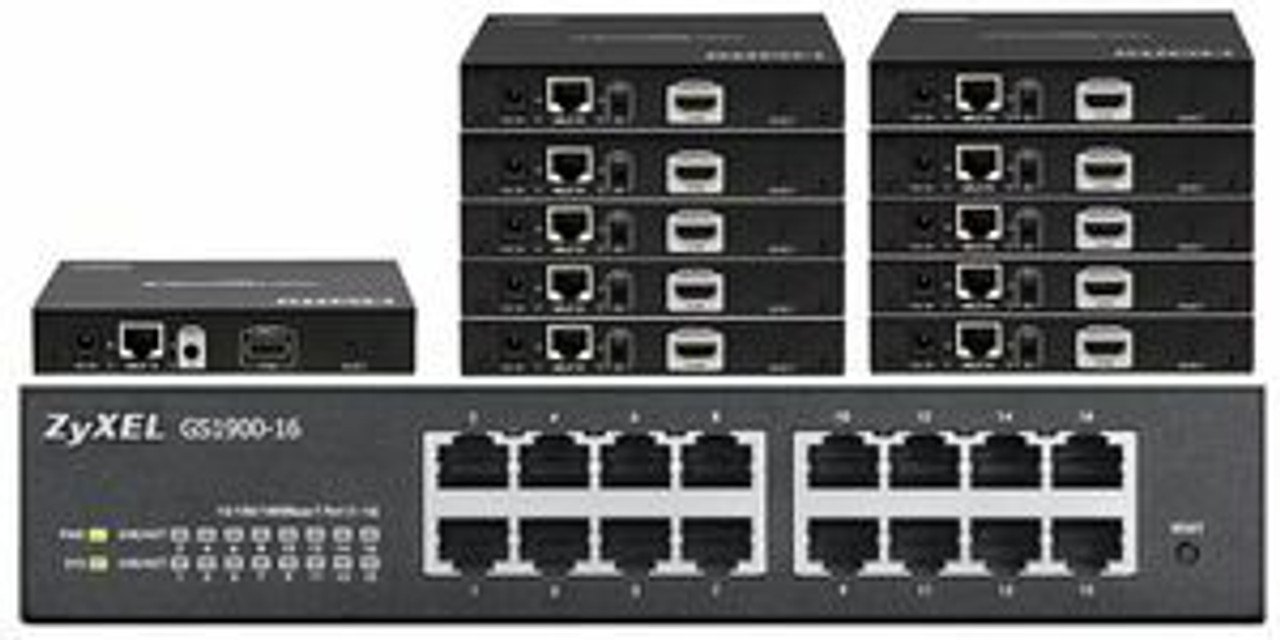
HDMI Splitters over a LAN
HDTV Supply’s WolfPack HDMI Splitter over LAN, also called an HDMI over IP or Ethernet extender—lets you share a single HDMI source across multiple displays, ideal for digital signage, video conferencing, and collaborative setups.
The system includes a transmitter connected to the source and receivers connected to displays, all linked via LAN. This setup allows content to be extended to screens in different rooms or buildings, offering a scalable and efficient AV solution.
These WolfPack HDMI Splitter over a LAN feature:
- Send HDMI over CAT6 to dozens of TVs
- Distances can be up to 400 feet
- 1080p, 4K/30 and 4K/60 resolutions
- Control source (cable box, etc.) from afar
These preconfigured systems are so simple to install and use one to many HDMI over IP extenders. They are all HDCP compliant and support resolutions up to 4K 60 4:4:4. Configure any size HDMI matrix switch or HDMI splitter over a LAN using these HDMI over IP Transmitters (TX) and Receivers (RX) with only the number of ports available on the Ethernet LAN switch limiting the number of ins and outs of your design. Need help? Call 833-WOLFPACK (833-965-3722).
WolfPack HDMI Splitters over a LAN
A WolfPack HDMI Splitter over a LAN lets you take one HDMI source — a cable box, Blu-ray player, DirecTV receiver, or any HDMI device — and distribute that same signal to up to 47 TVs simultaneously over standard CAT6 network cable or a managed Gigabit Ethernet switch. No dedicated coax runs. No proprietary cable plant. Just your existing network infrastructure doing the heavy lifting.
These systems use IP multicast technology to send video and audio across your LAN to any number of decoder endpoints. Add a TV simply by plugging in another decoder. The source never knows how many displays are watching.
HDTV Supply has carried WolfPack HDMI over LAN splitters for over 20 years. Call 833-WolfPack (833-965-3722) and talk to a real AV engineer — not a chatbot — who can match the right system to your room count, resolution requirement, and budget.
WolfPack HDMI over LAN Splitter Families
1080p HDMI over CAT6 Splitters — Up to 47 TVs
The entry point for large-scale HDMI distribution. One transmitter connects to your HDMI source; up to 47 receivers connect to TVs anywhere on the same CAT6/Ethernet network. Supports 1080p Full HD, HDCP, and standard managed switch IGMP multicast. Ideal for sports bars, restaurants, and hospitality installs where 4K is not required and budget efficiency matters.
Shop 1080p Splitters →4K 30Hz HDMI Splitters to 47 TVs with PoE
Step up to 4K 30Hz resolution with built-in Power over Ethernet (PoE) — no separate power supplies at each receiver. The transmitter and receivers draw power directly from your PoE-capable network switch, dramatically simplifying ceiling and wall installations. Supports 4K 30Hz, HDR, HDCP 2.2, and IGMP multicast. Perfect for hotels, corporate lobbies, and retail displays where clean cable runs matter.
Shop 4K 30Hz Splitters with PoE →1080p HDMI Splitters with Video Preview
All the benefits of 1080p LAN distribution plus a built-in web-based video preview interface. The transmitter generates a low-latency thumbnail preview of the HDMI source viewable from any browser on the same network. Ideal for broadcast control rooms, digital signage managers, or AV technicians who need to verify source content before it hits the displays.
Shop 1080p Splitters with Preview →4K 30Hz HDMI Splitters with Video Preview
4K 30Hz resolution distribution combined with live source preview. Monitor what's being distributed across your LAN without walking the floor. A strong choice for sports bars running multiple sources — confirm the right game is going to the right zone before guests start complaining.
Shop 4K 30Hz Splitters with Preview →4K 60Hz AV Over IP Splitters — Up to 24 TVs
Full 4K 60Hz (4:4:4) distribution over a managed Gigabit Ethernet switch. This is the highest-quality AV over IP splitter in the WolfPack lineup — delivering broadcast-quality color depth and motion clarity to up to 24 displays simultaneously. Supports HDR, HDCP 2.2, zero-frame latency, and standard IGMP multicast. The right choice when 4K 60Hz accuracy is non-negotiable: medical, gaming, broadcast, or premium hospitality.
Shop 4K 60Hz AV Over IP Splitters →4K 60Hz SDVoE HDMI Splitters — Up to 18 Displays
Software Defined Video over Ethernet (SDVoE) is the premium standard for zero-latency 4K 60Hz (4:4:4) distribution. SDVoE systems use 10 Gigabit Ethernet and deliver uncompressed video with no perceptible delay — critical for live video walls, gaming, and high-stakes presentation environments. Up to 18 4K displays from a single source. When compression is not an option, SDVoE is the answer.
Shop SDVoE 4K 60Hz Splitters →WolfPack HDMI Splitter over a LAN Accessories
Replacement power supplies, additional CAT6 receivers, rack mount brackets, managed switches recommended for IGMP multicast, and other accessories to complete your WolfPack LAN splitter installation.
Shop LAN Splitter Accessories →How Does an HDMI Splitter over a LAN Work?
An HDMI over LAN splitter system consists of two components: a transmitter (encoder) and one or more receivers (decoders). The transmitter connects to your HDMI source and converts the video/audio signal into IP data packets. Those packets are sent via IGMP multicast across a managed Gigabit Ethernet switch. Each receiver on the same network VLAN decodes those packets and outputs HDMI to its connected TV — all simultaneously, in real time.
Because IP multicast sends one stream that all receivers tap into simultaneously, you can add receivers (and TVs) without any performance impact on the source or the other displays. The switch handles the replication.
Key requirement: A managed Ethernet switch with IGMP snooping enabled is required. Standard unmanaged switches will flood the network with multicast traffic and cause performance problems. HDTV Supply can advise on compatible switch models — call us at 833-965-3722.
HDMI Splitter over LAN vs. HDMI Matrix Switcher over LAN — What's the Difference?
An HDMI splitter over a LAN sends one source to many displays. Every display shows the same content. It is a one-to-many broadcast.
An HDMI matrix switcher over a LAN (AV over IP matrix) sends multiple sources to multiple displays, with each display independently selectable. Any TV can show any source at any time. If you need zone control — different content in different areas — you need a matrix switcher, not a splitter.
Not sure which you need? Call 833-965-3722 and describe your setup. We'll tell you in 60 seconds.
Why Choose WolfPack HDMI over LAN Splitters from HDTV Supply?
- 25 years of AV distribution expertise — we've installed these systems in sports bars, hotels, hospitals, universities, and corporate campuses nationwide.
- U.S.-based human support — call 833-WolfPack and reach an engineer who knows the product, not a script reader.
- Full resolution lineup — 1080p, 4K 30Hz, 4K 60Hz, and SDVoE all in one place, so you can right-size the system to your budget and requirements.
- No proprietary cabling required — all WolfPack LAN splitters run over standard CAT6 and managed Gigabit Ethernet switches you may already own.
- Scalable from 2 to 47 displays — start small, add receivers as your deployment grows.
Frequently Asked Questions — WolfPack HDMI Splitters over a LAN
What is an HDMI splitter over a LAN?
An HDMI splitter over a LAN is a system that converts one HDMI source signal into IP data and distributes it via multicast over a managed Ethernet network to multiple HDMI decoder receivers, each connected to a TV or display. It allows one source — such as a cable box or streaming device — to be viewed simultaneously on many TVs without running individual HDMI cables from the source to each display.
How many TVs can a WolfPack HDMI over LAN splitter support?
WolfPack HDMI over LAN splitters support up to 47 simultaneous TVs depending on the model. The 1080p and 4K 30Hz systems support up to 47 displays. The 4K 60Hz AV over IP splitters support up to 24 displays. The SDVoE 4K 60Hz systems support up to 18 displays. All are expandable — simply add more receivers.
Do I need a special network switch for HDMI over LAN distribution?
Yes. You need a managed Gigabit Ethernet switch with IGMP snooping enabled. Unmanaged switches will broadcast multicast traffic to every port on the network, causing congestion and picture quality issues. For 4K 60Hz SDVoE systems, a 10 Gigabit switch is required. HDTV Supply can recommend compatible switches for your system — call 833-965-3722.
What is the difference between 4K 30Hz and 4K 60Hz HDMI over LAN splitters?
4K 30Hz splitters deliver 3840x2160 resolution at 30 frames per second. They are well-suited for static content, digital signage, and general TV distribution where smooth motion is not critical. 4K 60Hz splitters deliver the same resolution at 60 frames per second with full 4:4:4 color — they are required for live sports, gaming, and any fast-motion content where frame rate and color accuracy matter.
What is SDVoE and why would I choose it over standard AV over IP?
SDVoE (Software Defined Video over Ethernet) is an uncompressed 4K 60Hz distribution standard running over 10 Gigabit Ethernet. Unlike standard AV over IP which uses compression (JPEG2000 or similar), SDVoE sends the raw video stream with zero compression, resulting in zero perceptible latency and no compression artifacts. It is the preferred choice for video walls, broadcast monitoring, gaming, and any application where a single frame of delay or any image quality loss is unacceptable.
Can I use a WolfPack LAN splitter with DirecTV or cable boxes?
Yes. Any HDMI source — DirecTV receivers, Dish Network boxes, cable boxes, Apple TV, Roku, Blu-ray players, gaming consoles, or computers — can connect to the WolfPack transmitter. The system distributes the HDMI output of that source to all connected displays. Note that HDCP-protected content requires HDCP 2.2-compliant receivers; all WolfPack LAN splitters support HDCP.
What is PoE and which WolfPack LAN splitter models include it?
PoE stands for Power over Ethernet. In a PoE-enabled system, the network switch supplies electrical power to the receivers through the same CAT6 cable carrying the video data — eliminating the need for a separate power adapter at each TV location. The WolfPack 4K 30Hz HDMI Splitters to 47 TVs model includes PoE support, making it ideal for ceiling-mounted or in-wall receiver installations where running a power outlet would be impractical.
What is the maximum cable distance for HDMI over LAN splitters?
The maximum CAT6 cable run between any device and the network switch is 328 feet (100 meters) per standard Ethernet specifications. Because the signal travels as IP data over the network, total end-to-end distance is not limited to a single cable run — you can cascade switches to cover any building footprint, as long as no single CAT6 segment exceeds 328 feet.
How do I control a WolfPack HDMI over LAN splitter?
WolfPack LAN splitters are typically managed via a web-based GUI accessible from any browser on the same network. Models with video preview include a live source monitoring interface. The transmitter is configured once for your network VLAN and multicast group; receivers auto-discover and join the stream. No ongoing management is required for single-source distribution. For multi-source matrix configurations, see the WolfPack AV over IP Matrix Switcher line.
Will an HDMI over LAN splitter work on the same network as my regular data traffic?
Yes, with proper VLAN and IGMP configuration. It is strongly recommended to place AV over IP traffic on a dedicated VLAN, separate from your general data network. This isolates multicast streams from regular traffic and prevents either network from impacting the other. A managed switch is required to create VLANs. HDTV Supply provides network configuration guidance with every system purchase — call 833-965-3722 for help.
Questions about which WolfPack HDMI over LAN splitter is right for your installation? Call 833-WolfPack (833-965-3722) or email customerservice@hdtvsupply.com. We've been solving AV distribution problems for 25 years and can help you choose the right system, the right switch, and the right cable plan for your space.